Getting started
Platform at a glance
The four surfaces people use, the building blocks inside a Solution and the shared foundations everything runs on.
- Everyone
Last reviewed
Flexday AI has three layers. People work through four surfaces. What they build lives inside a Solution, a container that holds every building block for one purpose. Underneath, a set of shared foundations provides sign-in, isolation, storage, background processing, AI models and a record of changes, file reads and AI usage.
At a glance
- Four surfaces: the Studio to build, Apps to use what was built, the Flex Gateway for systems to call it, and the Admin Console for Flexday staff.
- One Solution per purpose: its app, data, documents, files, automations, agents, API, credentials and settings are owned and secured together, and each main building block keeps its own numbered versions.
- Shared foundations: every Solution gets the same identity, isolation, storage, job, AI and audit services, so none of them is rebuilt per project.
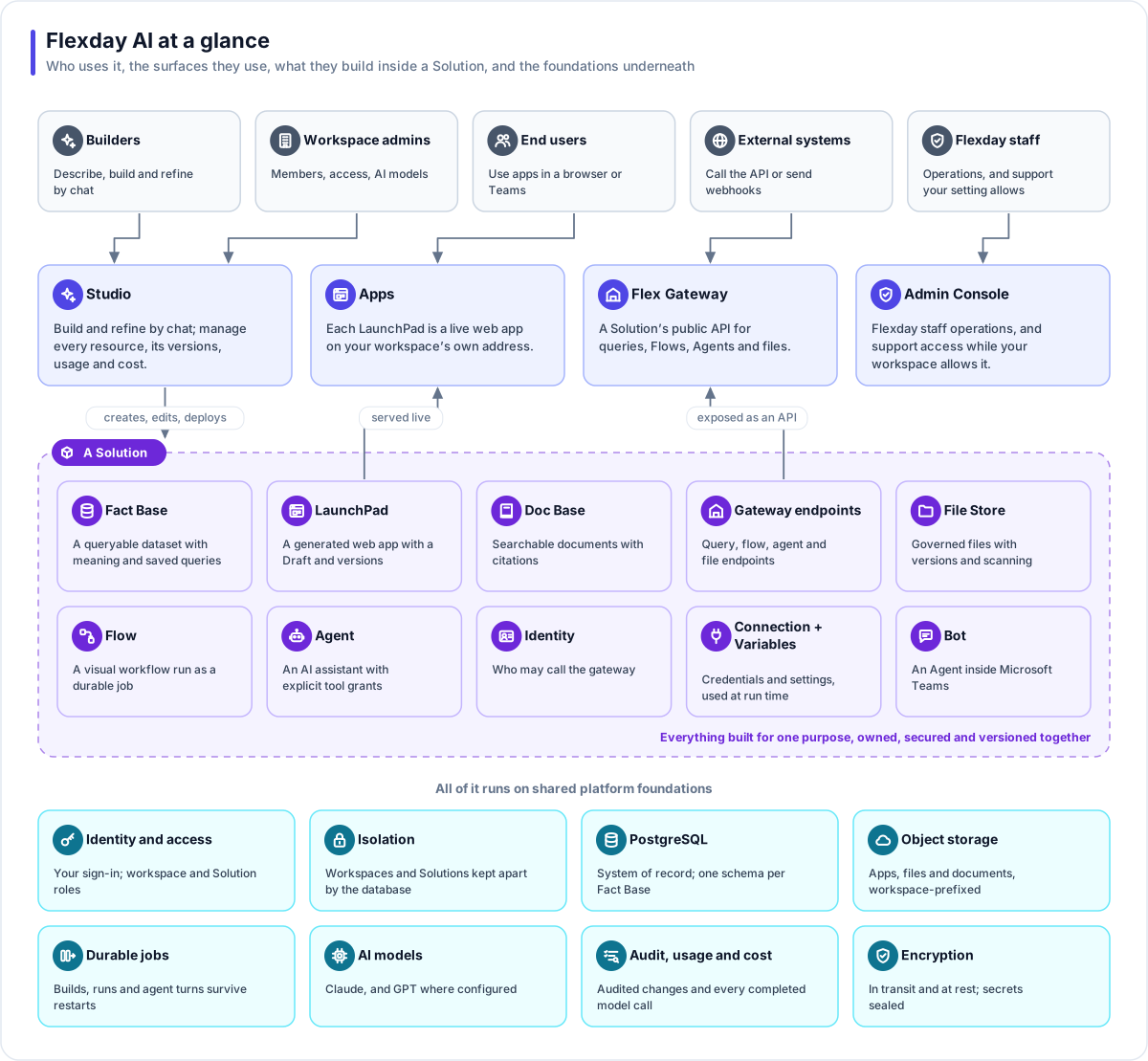
Who uses it
| People | What they do |
|---|---|
| Builders | Business users and analysts who describe, build and refine Solutions by chat in the Studio |
| Workspace admins | Owners and admins who manage members, Solution grants and AI model settings for their workspace |
| End users | People who use the generated apps in a browser, or talk to an assistant in Microsoft Teams. They never need a Studio account |
| External systems | Partner systems and scripts that call a Solution through its API, or start a workflow with a webhook |
| Flexday staff | Platform operations and customer support. Staff can open a time-limited, recorded support session in a workspace only while its Support access setting is on; it is on by default and an owner can switch it off |
The four surfaces
| Surface | What it is for |
|---|---|
| Studio | The web application where you build, run and govern Solutions. It holds the Builder, Data Studio (datasets, documents and files), Executors (workflows, agents and gateways), Credentials (identities and connections; a Solution's Variables are on its own Variables tab), and Insights tabs such as Usage, History and Versions on most resources |
| Apps | Each deployed app is a live website, at an address carrying your workspace's name where your deployment provides one. You preview the draft, deploy a numbered version and roll forward whenever you choose |
| Flex Gateway | A Solution's public API (application programming interface). Its endpoints run saved queries, workflows, agents and file operations, each with its own access rule: follow the gateway's sign-in, require sign-in, or allow anonymous callers |
| Admin Console | The Flexday staff console: workspaces, plans and quotas, health, jobs, audit and support access. Customers never need it |
Inside a Solution
Every building block is created inside a Solution and can reference only what is inside the same Solution. Sharing is decided once, on the Solution, and everything it owns follows.
| Building block | What it is |
|---|---|
| Fact Base | A queryable dataset: a live PostgreSQL schema of its own, a business definition, sample data and saved queries |
| Data Portrait | An optional enrichment of a Fact Base: a measured profile of the data and a business ontology on top |
| LaunchPad | A generated web app with a draft you can change safely, numbered versions and one live version |
| Doc Base | A searchable document collection: upload or crawl, then keyword, semantic or hybrid search with citations |
| File Store | Governed file storage: folders, versions, audience tags, retention and quota, with malware scanning where your deployment has a scanner switched on |
| Flow | A visual workflow: triggers, conditions, loops, queries, HTTP calls, email, files, forms, AI steps and business-application steps |
| Agent | A conversational AI assistant with an explicit list of tools, guardrails, budgets, memory and evaluations |
| Flex Gateway endpoints | Named API endpoints of four kinds: query, flow, agent and file, each with its own access rule |
| Identity | Who may call the gateway: your identity provider, API keys, signed requests or client certificates |
| Connection and Variable | Stored credentials for outside systems, and typed settings and secrets, read only when a step or a tool uses them |
| Bot | A published Agent made available in Microsoft Teams, with consent-gated outreach |
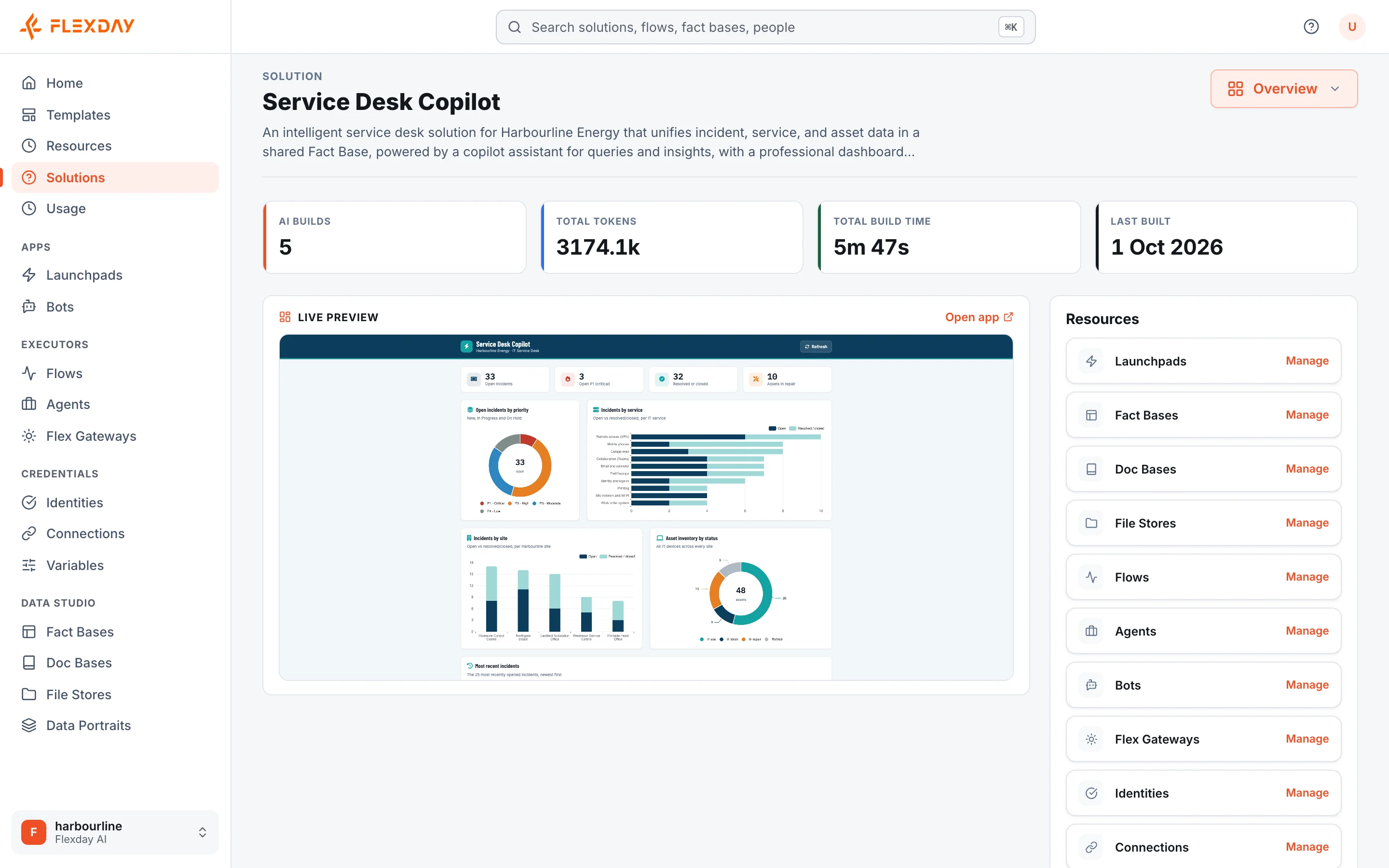
Two more ideas complete the picture. An Integration is a Flow step that acts in a business application your company already uses, such as ServiceNow. Interactive cards let a conversation show a document or collect a validated form.
Beyond a single Solution, a Template is a reusable, working copy that people start new Solutions from, and a whole Solution can be exported to one bundle file and imported as a new Solution elsewhere.
The shared foundations
| Foundation | What it gives you |
|---|---|
| Identity and access | Sign-in through your identity provider; workspace roles and Solution roles |
| Workspace and Solution isolation | Enforced in the database itself for each workspace's Solutions and the resources in them; records written as the platform runs, such as usage, access logs, run and conversation history and a document's indexed text, carry the workspace and are filtered by the platform |
| PostgreSQL system of record | Every platform record, plus one database schema per Fact Base |
| Object storage | Generated apps, files and documents, every key prefixed with its workspace |
| Durable background jobs | Builds, workflows, document indexing and agent turns survive restarts |
| AI models | Anthropic Claude models for reasoning, Azure AI Foundry GPT models where configured, and embedding models for search |
| Audit, usage and cost | Platform changes are audited, file reads are logged, and every completed model call is metered |
Note
The same foundations run in every deployment model: Flexday SaaS, a private cloud on AWS or a private cloud on Azure. See Deployment models.
Enterprise readiness at a glance
For a buying committee, each of these has a page of its own, written for the reviewer who asks, and a four-week proof-of-concept plan ties them together.
- Security model: sign-in through your identity provider, enforced by default, and isolation in the database. See Security overview.
- Questionnaire: the questions vendor-risk reviews ask, answered from the code and infrastructure. See Security questionnaire, answered.
- Privacy: what data is held, where, for how long, and what reaches an AI model provider. See Data protection and privacy.
- Responsible AI: grants, guardrails, evaluation before release, and alignment with the NIST AI Risk Management Framework. See Responsible AI.
- Where it runs: Flexday SaaS, or a dedicated deployment in your own AWS or Azure account. See Deployment options and data residency.
- Continuity: backups, durable jobs and automatic rollback, as the infrastructure code defines them. See Reliability and business continuity.
- Compliance support: platform mechanisms mapped to SOC 2 criteria, ISO/IEC 27001:2022 and the GDPR. See How the platform supports your compliance.
- Portability and exit: export bundles in open formats, and deletion that is real. See Portability and exit.