Use cases › Service Desk Copilot
Teams experience
What Harbourline employees see when they chat with the service desk bot in Microsoft Teams, and the rules the Bot and its Agent follow.
- Everyone
Last reviewed
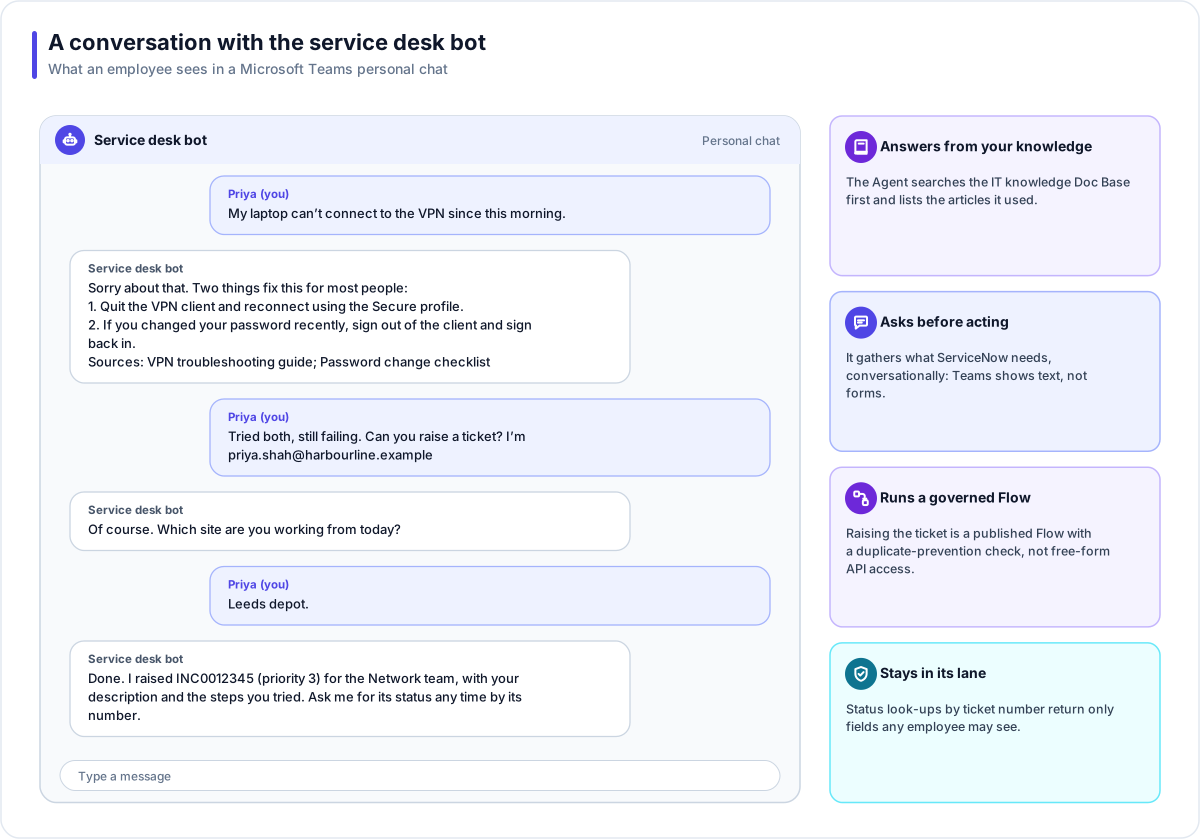
For most Harbourline employees, the Service Desk Copilot is simply a contact in Microsoft Teams. They ask for help in their own words. The Bot answers from Harbourline's IT knowledge, and when that is not enough it raises a complete ticket in ServiceNow and gives them the number.
What employees can do
| They ask | The Bot does |
|---|---|
| "How do I set up the VPN on a new laptop?" | Searches IT knowledge and answers, with the articles it used under Sources. |
| "My laptop can't connect to the VPN." | Suggests the documented fixes first. |
| "Please raise a ticket." | Collects the work email, site, device and what was tried, confirms, then raises it and gives the number. |
| "What's happening with INC0012345?" | Reports its state, assignment group and last update. |
| "Stop" (as the whole message) | Stops any messages the Bot would start. Answers to their questions still come. |
How a conversation works
- The message arrives. Microsoft delivers it to the Bot; its signature is checked and a duplicate delivery is dropped.
- The conversation continues. The same person in the same chat carries on the same session, so the Agent remembers what was said a moment ago.
- Teams shows the typing indicator while the Agent works.
- Guardrails run first. Personal data is masked, and a request to reset someone else's password is refused by a blocked topic before the model sees it.
- Knowledge before opinion. With grounding on, the Agent searches before it states a fact about Harbourline's systems, and says so when it cannot find one.
- Tools are limited to grants. Search IT knowledge, look up one incident by number, and run the Raise incident Flow. Nothing else.
- The answer arrives complete. A long answer is split into several messages at paragraph breaks.
What the Bot will not do
| Limit | Why |
|---|---|
| Show forms or files | Teams conversations with a Bot are text only, so the Agent has forms switched off and gathers details by asking. |
| Show runbooks | Runbooks are tagged it-staff, and Teams does not tell the platform a person's groups. IT staff use the dashboard's chat for those. |
| List someone's tickets by name | Teams identifies people by their Microsoft account, not their email, so look-ups are by ticket number only and return fields any employee may see. |
| Link to cited articles | Citations are names, because each document sits behind the platform's own access rules. |
| Message people who have never used it | A conversation exists only after someone interacts with the Bot, or it is installed for them. |
Messages the Bot starts
The P1 alert Flow messages on-call engineers in their personal chats with the Bot. Before any message the Bot starts:
- The Bot must be live.
- The person must not have opted out. Typing STOP (or UNSUBSCRIBE) as a whole message in a one-to-one chat opts out; START (or RESUME) opts back in. Removing the app also opts out.
- The Solution's allowance of 60 messages an hour, shared by every sender, must not be used up.
Each message is recorded in the Bot's Deliveries view, and a retry never resends one that already went out.
Getting the Bot to people
- Harbourline's builders create the Bot with a managed registration, so Flexday AI holds the Microsoft registration.
- Verify, then Go live once the Agent is published and switched on.
- A Microsoft 365 administrator publishes it to Harbourline's Teams catalogue in one step, signing in for that publish only; nothing is stored.
- Harbourline's Teams admins pre-install the app for on-call engineers, so they have a conversation the
P1 alert can reach, and the builders copy those conversations into the
P1_ONCALL_CONVERSATIONSVariable.
Measuring it
The Agent's Analytics view shows conversations, people, the tools used, the articles cited, guardrail events and feedback. Harbourline reviews the questions that ended in a ticket each month and adds articles for the most common ones, which the Doc Base indexes automatically.