Use cases › Service Desk Copilot
Data flows
The four ways data moves through the Service Desk Copilot - ServiceNow pushes, the nightly reconcile, raising a ticket from Teams, and P1 alerts - step by step.
- Technical
Last reviewed
Data moves through the Service Desk Copilot in four ways. ServiceNow pushes every incident change in. A nightly Flow pulls open incidents to catch anything missed. An employee raises a ticket from Teams, which writes to ServiceNow. And a priority 1 incident fans out as alerts. This page follows each one.
At a glance
| Flow of data | Direction | Trigger | Protected by |
|---|---|---|---|
| 1. ServiceNow pushes an incident | ServiceNow → Fact Base | A ServiceNow business rule on every insert or update | API key on the intake gateway |
| 2. The nightly reconcile | ServiceNow → Fact Base | A schedule at 02:00 | The ServiceNow Connection (OAuth) |
| 3. Raising a ticket from Teams | Teams → ServiceNow | An employee asks the Bot | Microsoft's signature; the Agent's grants; the ServiceNow Connection |
| 4. A P1 alert | Fact Base event → Teams, status page, email | A priority 1 incident in data flow 1 | Consent and allowances; a Secret Variable; the Solution's email rules |
Data flow 1: ServiceNow pushes an incident
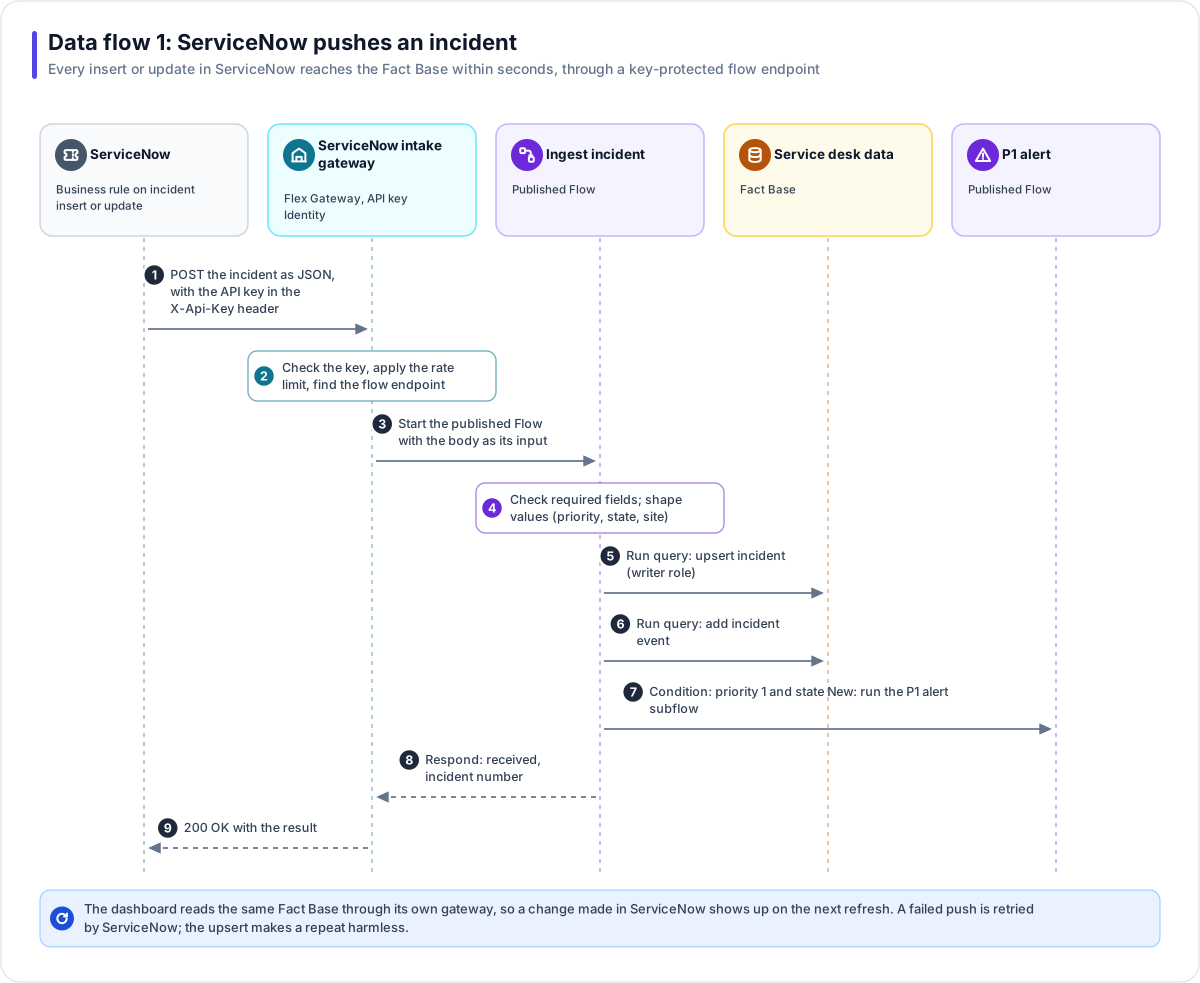
- ServiceNow sends the change. A business rule on the incident table (after insert and after
update) calls an outbound REST message: a
POSTto the intake gateway's flow endpoint on Harbourline's apps address, with the incident as JSON and the API key in theX-Api-Keyheader. - The gateway checks the caller. The key is checked against the ServiceNow push key Identity, the per-caller rate limit applies, and the flow endpoint is found.
- The Flow starts. The published Ingest incident Flow runs, with the request body as its input.
- Fields are checked. The Flow stops with a clear failure if the record ID or number is missing, and shapes priority, state and site into the Fact Base's values.
- The incident is saved. A Run query step runs the saved
upsert_incidentwrite query under the writer role: a new incident is inserted, a known one is updated. - The change is recorded. A second write query adds a row to
incident_events, which the dashboard uses for "recent changes". - P1 check. If the priority is 1 and the state is New, the Flow runs the P1 alert subflow (data flow 4).
- Respond. The Flow's Respond step returns "received" with the incident number, and ServiceNow gets a 200 response.
What ServiceNow sends (fields chosen by Harbourline; the Flow reads them by name):
{
  "sys_id": "9d385017c611228701d22104cc95c371",
  "number": "INC0012345",
  "short_description": "VPN will not connect",
  "priority": "3",
  "state": "New",
  "category": "network",
  "assignment_group": "Network",
  "site": "Leeds depot",
  "opened_at": "2026-09-28T08:14:03Z",
  "updated_at": "2026-09-28T08:14:03Z"
}
Tip
Because the save is an upsert keyed on the ServiceNow record ID, a repeated push is harmless. If a push fails, ServiceNow's own retry, or the nightly reconcile, brings the row up to date.
Alternative: a signed webhook
A system that can sign its requests can start a Flow with a webhook trigger instead. The Flow gets
an unguessable address and a signing secret; the caller sends the JSON body with an
X-Flow-Signature: sha256=<hex> header (an HMAC-SHA256 of the body) and, optionally, an
Idempotency-Key header so a repeated delivery returns the first run. Harbourline chose the API key
because ServiceNow's outbound REST messages set a header easily.
Data flow 2: the nightly reconcile
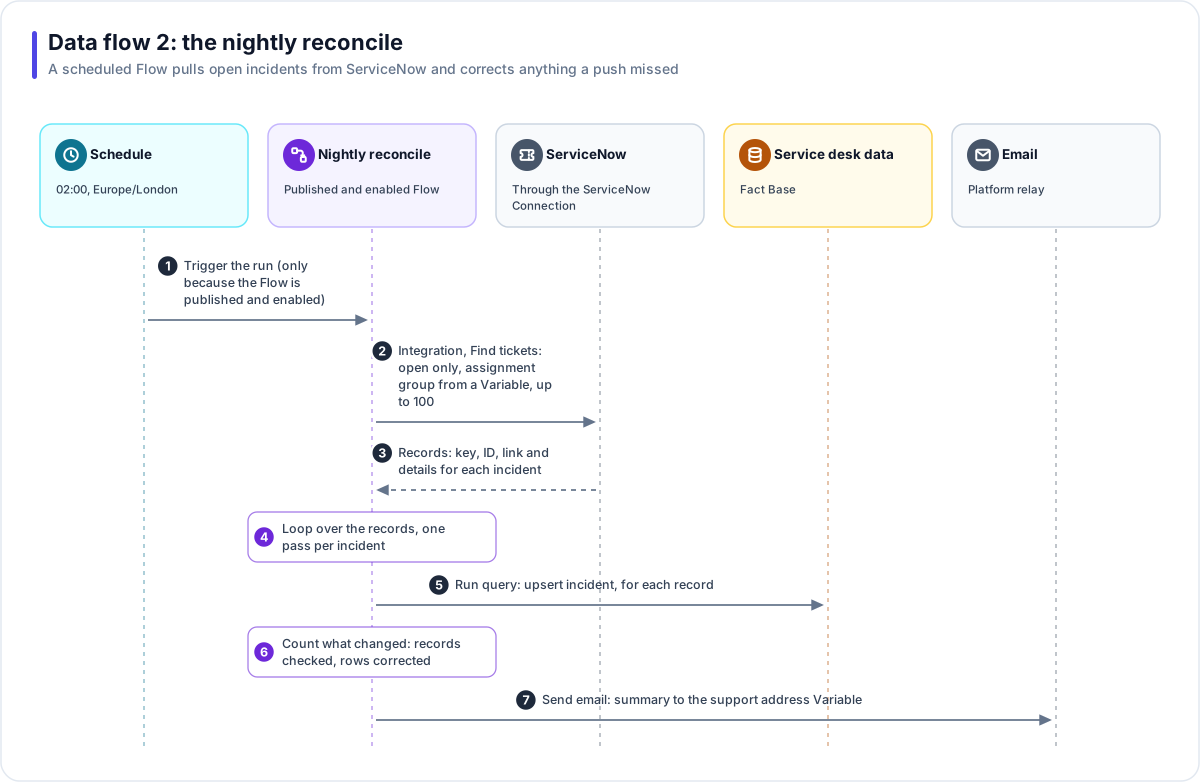
- The schedule fires at 02:00 Europe/London. It fires only because the Flow is both published and switched on.
- Find tickets. An Integration step asks ServiceNow for open
incidents in the assignment group named by the
SERVICENOW_ASSIGNMENT_GROUPVariable, up to 100. - Records come back with each incident's key, ID, link and details.
- Loop. One pass per incident.
- Upsert. The same
upsert_incidentwrite query corrects any row a push missed. - Count. The Flow counts the records checked and the rows it changed.
- Summary email to the address in
SUPPORT_EMAIL.
Closed incidents arrive through data flow 1 when ServiceNow updates them. The reconcile only corrects open ones, so it never closes an incident just because it was beyond the first 100.
Data flow 3: raising a ticket from Teams
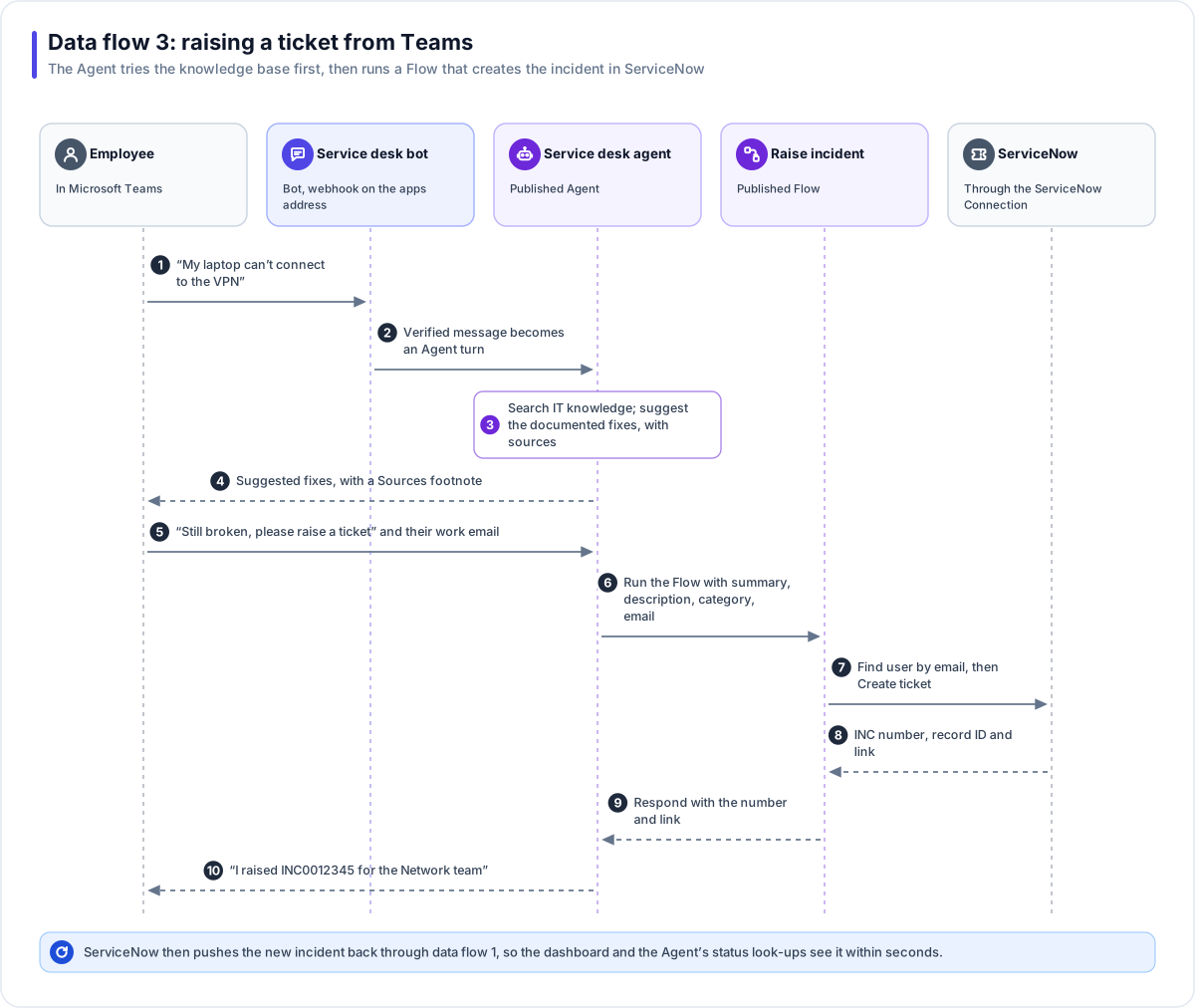
- The employee asks in a personal chat with the Service desk bot.
- The message becomes an Agent turn once Microsoft's signature is verified.
- Knowledge first. With grounding on, the Agent searches the IT knowledge Doc Base and suggests the documented fixes.
- The reply cites its sources in a Sources footnote.
- Still broken. The employee asks for a ticket. The Agent collects what ServiceNow needs (work email, site, device, what was tried) in conversation, and confirms before acting.
- The Agent runs the Flow through its run-Flow grant, passing the summary, description, category and email.
- Find user, then Create ticket. The Flow looks up the caller's ServiceNow record by email, then creates the incident in the assignment group from the Variable. If the call is interrupted, the duplicate-prevention field lets the step check whether the ticket landed instead of creating a second.
- ServiceNow returns the number, record ID and link.
- The Flow responds to the Agent with the number and link.
- The Agent replies in Teams.
ServiceNow then pushes the new incident through data flow 1, so the dashboard and the Agent's status look-ups see it within seconds.
Data flow 4: a P1 alert
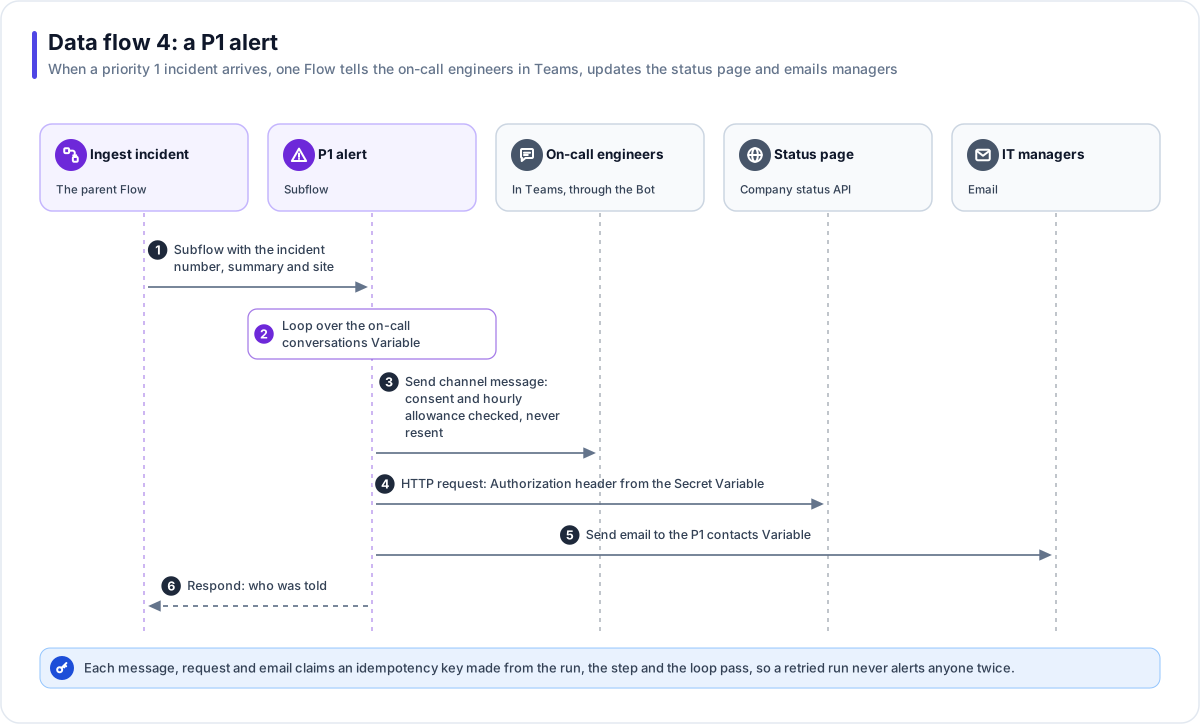
- Subflow. Ingest incident passes the number, summary and site to P1 alert.
- Loop over the conversations in the
P1_ONCALL_CONVERSATIONSVariable. - Teams message. A Send channel message step addresses each conversation. The Bot must be live, the person must not have sent STOP, and the Solution's hourly allowance is spent; each message is sent once and recorded.
- Status page. An HTTP request step posts a notice, with the
Authorizationheader filled from theSTATUSPAGE_TOKENSecret Variable. The token is read at that moment and never appears in the run history. - Email to the managers in
P1_NOTIFY_EMAILS, under the Solution's email rules. - Respond with who was told.
Every message, request and email claims an idempotency key made from the run, the step and the loop pass, so a retried run never alerts anyone twice.
Data inventory
| Data | Comes from | Stored in | Who can see it |
|---|---|---|---|
| Incident rows and events | ServiceNow pushes and the reconcile | Service desk data (Fact Base) | Signed-in dashboard users through read queries; the Agent through incident_status only |
| Knowledge articles | ServiceNow exports | IT knowledge (Doc Base) and its File Store | Everyone who can search |
| Runbooks | IT team uploads | IT knowledge, tagged it-staff | Dashboard chat users holding the it-staff tag |
| Conversations | Teams and the dashboard chat | Agent sessions and turns | Solution Managers, Editors and Viewers in Studio |
| Credentials | Entered once | Sealed Connection, Identity and Secret Variable | Nobody: never shown again |