Components
Integration
A Flow step that does one typed thing in a business application such as ServiceNow, using a saved Connection instead of a URL or request body.
- Everyone
- Technical
Last reviewed
An Integration is a Flow step that acts in a business application your company already uses, such as raising a ServiceNow incident or finding a user. You pick the application, the action and a saved Connection from lists, and fill in a form the application describes. The step never holds a web address, a method, a header or a raw request body.
Note
In one sentence: an Integration is a typed, governed door into a business application: ServiceNow ships today with nine actions, and every action returns the same shape of result.
Why it matters
- No integration code. People pick from lists and fill in a form, so a business analyst can wire a Flow to ServiceNow.
- Harder to misuse. Which system is written to, and under whose credential, is fixed in the step and cannot be changed by data flowing through the Flow.
- No duplicate tickets. If a create is interrupted, the step can check whether it landed rather than sending it again.
- Credentials stay sealed. The credential lives in a Connection, is used only while the step runs, and is never shown again.
Key concepts
| Term | What it means |
|---|---|
| Application | The outside system, such as ServiceNow. Applications are built into Flexday AI, not added by users. |
| Action | One typed operation an application offers, such as Create ticket or Find user, with its own form. |
| Connection | A saved credential for one application: choose kind Application, then the application. |
| Authentication | How the application accepts the credential. The recommended option is listed first. |
| Result | Every action returns the record's key, ID and link, plus action-specific details, in one shape. |
| Duplicate-prevention field | A unique field named on the Connection, so an interrupted create can be checked. |
| In doubt | A write cut off mid-request that could not be checked. It is never sent a second time. |
How it works
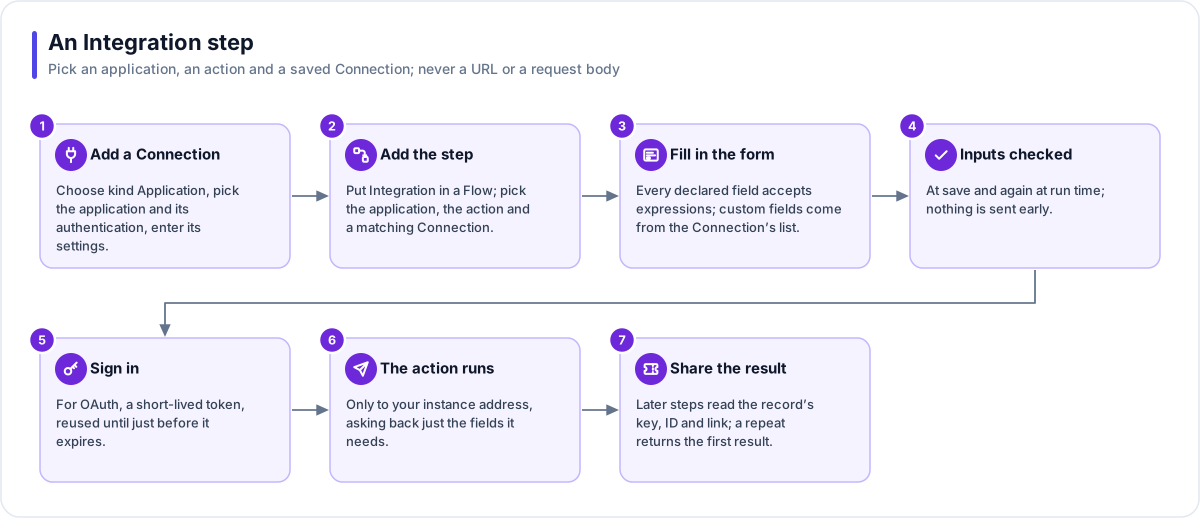
- Add a Connection. Choose kind Application, pick the application and its authentication, then enter its settings, such as your instance address.
- Add the step. Put Integration in a Flow, then pick the application, the action and a matching Connection.
- Fill in the form. Every field the action declares accepts expressions, so it can use data from earlier steps or a Variable. Custom fields come from the Connection's allow-list.
- Inputs checked. Values are checked against the action's fields when you save and again when the step runs. Nothing is sent early.
- Sign in. For OAuth, the credential becomes a short-lived token, reused until just before it expires.
- The action runs. The request goes only to your instance address, and asks back only for the fields the action needs.
- Share the result. Later steps read the record's key, ID and link. A repeated run returns the first result.
ServiceNow actions
| Action | What it does |
|---|---|
| Create ticket | Raise an incident |
| Get ticket | Read one incident |
| Find tickets | Search incidents; returns a list to loop over (20 by default, up to 100) |
| Update ticket | Change fields on an incident |
| Add comment | Add a note, choosing Customer visible or Internal only every time |
| Assign ticket | Assign to a person or a group |
| Resolve ticket | Resolve an incident |
| Find user | Look up a person |
| Find group | Look up an assignment group |
The ServiceNow Connection accepts OAuth client credentials (recommended) or Basic authentication, and the instance address must use HTTPS.
When a write is interrupted
| What happened | What the step does |
|---|---|
| It succeeded | The Flow carries on with the record's key, ID and link. |
| The application refused | A missing mandatory field, a rejected credential or a permission denial fails the step with the reason. No retry. |
| The connection dropped | With a duplicate-prevention field, the step looks for the record: found is success, not found is safe to retry. |
| No way to check | Without that field, the step fails as in doubt and is never sent again. |
| It ran twice | A retried run or a restarted worker returns the first attempt's result: one ticket, not two. |
| The field is not unique | If the check finds two matches, the step says so and names the field, instead of guessing. |
Tip
Name a duplicate-prevention field on the Connection. Until you do, Create ticket tries once by default, and raising its retry count shows a warning. Try new Flows on a non-production instance first.
Works with
- Flow: Integration sits under Connections in the step palette and uses the normal retry and error settings.
- Connection: holds the credential and the application settings.
- Variable: any action field can read a Variable, and a Secret Variable may be used in an action input.
- Loops: Find tickets returns a list to loop over, and each pass of a loop is its own write.
- Send email: a common next step, quoting the new ticket number with a link to the record.
- Agent: reaches an Integration by running a Flow; it cannot call one directly.
Governance and limits
| Area | What applies |
|---|---|
| Boundary | A Flow can use only Connections from its own Solution, made for the same application. The system and the credential are fixed in the step, never computed from data. |
| Access | Creating or changing a Connection needs edit rights on its Solution. A step whose Connection has no credential fails by name. |
| Retries | Create ticket and Add comment try once by default; reads and repeatable updates try 3 times. A refusal by the application is never retried; rate limits and outages are. |
| Safety | Only fields the action declares are sent and kept; custom fields must be on the Connection's allow-list. Writes never follow a redirect. |
| Limits | A response over 256 KB fails rather than being cut short. Each attempt times out after 30 seconds by default. Reads follow at most 3 redirects. |