Evaluating Flexday AI
Security overview
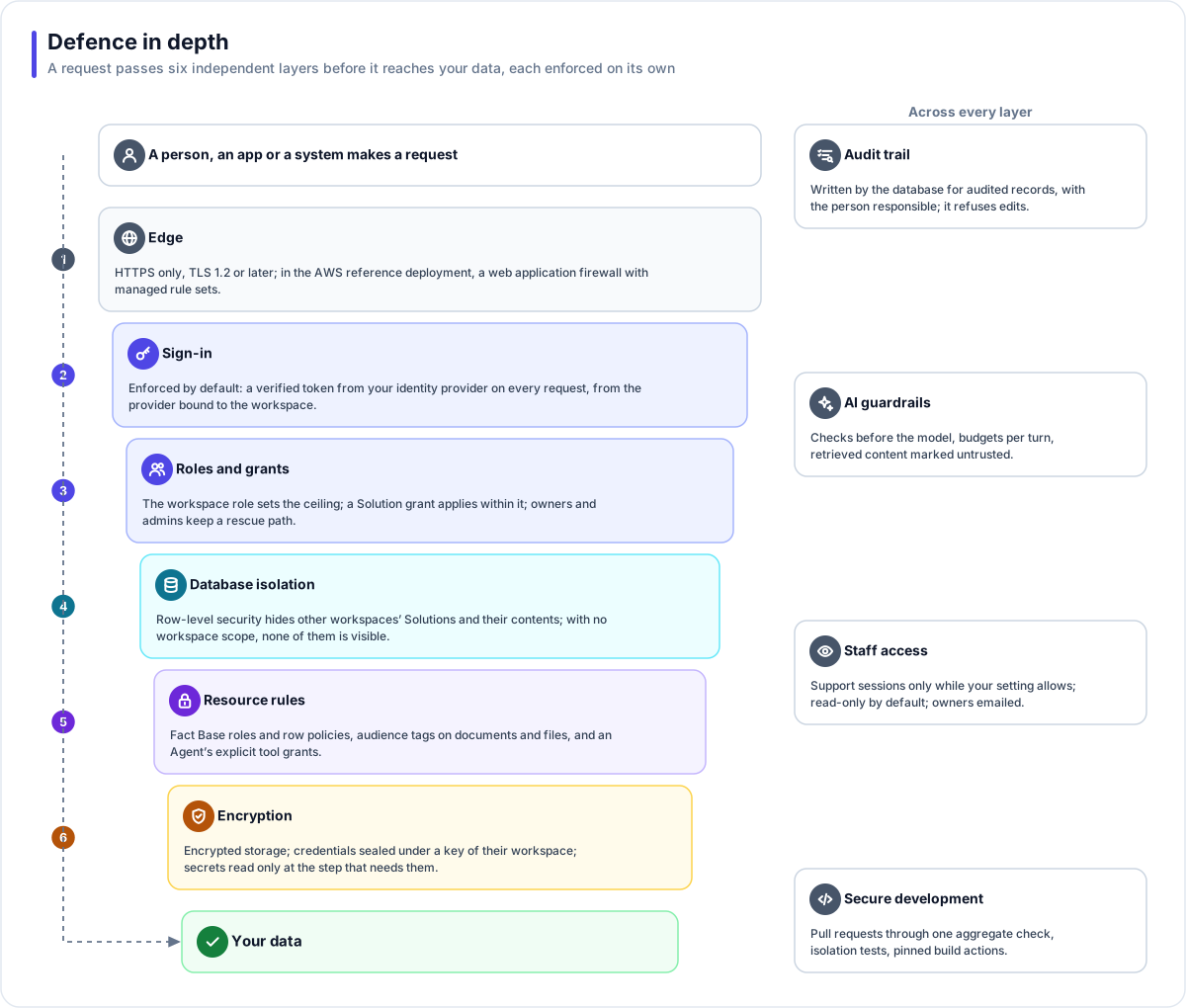
The Flexday AI security model on one page - sign-in, roles, database isolation, encryption, audit, AI controls, staff access, edge protection and development.
Written for
- Functional users
- Technical
Last reviewed
This is the security model of Flexday AI on one page, for a security architect deciding how much to trust it. Each topic gives the mechanism, what it means for you, and the page that goes deeper. Where the platform's own configuration leaves a gap, such as traffic inside the private network that is not encrypted, the page says so, because that is what a review would find. Answers to the usual questionnaire are in Security questionnaire, answered.
At a glance
- Your identity provider signs people in. Builders and end users sign in through providers you choose, or a user pool the deployment runs; Flexday AI's own database stores no passwords for them.
- Sign-in is enforced by default. A deployment refuses requests without a verified token unless an operator explicitly turns that off.
- The database keeps workspaces apart. Row-level security in PostgreSQL hides every other workspace's Solutions and resources, and fails closed.
- Encrypted where it leaves the network, and at rest. HTTPS at every public address, encrypted database connections, and encrypted storage.
- Accountable. Changes to platform records are audited by the database; file reads and model calls have their own records.
- Staff access follows your setting. A Flexday support session in your workspace is possible only while its Support access setting is on, which it is unless an owner turns it off.
Identity and single sign-on
- Mechanism. People who build sign in to the Studio through Microsoft Entra ID, Microsoft Entra External ID, Amazon Cognito, or any OpenID Connect or SAML provider. The people who use what is built sign in through the Identity a Solution attaches to its gateway: 30 provider presets and nine mechanisms, from OpenID Connect and SAML federation to API keys, signed requests and client certificates (client certificates only where the deployment turns them on). The credential is checked on every request: a signed token's signature and expiry always, and its issuer and audience wherever the sign-in setup names them; an opaque token is checked with the provider that issued it, and API keys, signed requests and client certificates by their own rules. Signing out of an app can also revoke the person's refresh token: the gateway does so where the provider publishes a standard revocation endpoint, which Microsoft does not.
- What it means. With your own identity provider, multi-factor authentication, conditional access and leaver processes stay in it. A token from one workspace's provider cannot act in another workspace that has its own provider.
- Read more. Identity and access, Identity.
Sign-in enforced by default
- Mechanism. A deployment checks a bearer token on every Studio API request unless an operator sets it otherwise, and turning it off makes the service print a warning at start-up. The only exceptions are a few public routes: health checks, the API description, the lookups a sign-in page makes, and addresses that carry their own credential, such as Flow webhooks. Flexday's AWS environments are configured with sign-in enforced. On such a deployment, unless it serves a single workspace, the API refuses to report itself ready if its database connection could bypass row-level security.
- What it means. A misconfigured deployment fails visibly rather than serving data openly.
- Read more. Identity and access.
Roles and Solution grants
- Mechanism. Four workspace roles (Owner, Admin, Member, Viewer) cap what a Solution grant (Manager, Editor or Viewer, optionally with an expiry date) can give: a grant never lifts someone past their workspace role. Workspaces are Open by default: everyone sees every Solution, and a grant can only raise someone's access. A workspace can instead be set to Restricted by the platform's operators, so that people see only the Solutions they hold a grant on; there is no Studio switch for this.
- What it means. Owners and admins always reach every Solution, so nothing can be locked away. Changing workspace settings, members and who a Solution is shared with is reserved for the roles that hold them.
- Read more. Identity and access.
Tenant isolation in the database
- Mechanism. Every Solution and every resource inside it carries its workspace, and forced PostgreSQL row-level security policies compare that with the workspace of the current request on every read and write. A request or background job with no workspace scope sees none of those records. In a Restricted workspace, further restrictive policies hide unshared Solutions. Activity records, such as usage and the audit trail, carry the workspace too and are filtered by the application. In the AWS reference deployment and the Docker Compose setup, the runtime that serves apps connects as a separate, least-privilege database role, and a build check fails if either stops doing so (the reference Azure Terraform does not set this yet). Automated tests run these checks under the restricted roles themselves, in both directions.
- What it means. Isolation does not rest on every line of application code remembering a filter. Stored objects are partitioned the same way: every object the platform writes goes under a workspace prefix.
- Read more. Data isolation.
Encryption in transit and at rest
| Where | Mechanism, as the AWS reference deployment configures it |
|---|---|
| Public addresses | HTTPS only: the load balancer redirects plain HTTP and allows TLS 1.2 or 1.3 under a FIPS policy; the content delivery network requires TLS 1.2 or later and connects to the load balancer over HTTPS. |
| To the database | Encrypted connections, required by the database; the services do not verify the database's certificate. |
| To object storage and the shared file system | Encrypted: the storage buckets refuse any request not made over TLS, and the services mount the file system with encryption in transit. |
| Inside the private network | The load balancer reaches the services over plain HTTP, and the connection to the Redis cache is not encrypted; encrypting the cache connection is a setting that is off as configured. |
| Database at rest | Encrypted storage, with a key managed by AWS. |
| Object storage and the shared file system at rest | Encrypted with a KMS key the deployment creates in its own account. |
| Stored credentials | Connection credentials, Identity secrets and Bot credentials are encrypted with AES-256-GCM under a key that belongs to their workspace, itself protected by a platform master key. |
| Secret Variables | Sealed where the deployment is set to keep them: Flexday AI's encrypted storage with the workspace's own key, the default and what the infrastructure code sets for Flexday's environments, or AWS Secrets Manager or Azure Key Vault. With Secrets Manager, every read and write is scoped to the workspace, so the cloud itself refuses another workspace's secret. |
- What it means. In that deployment, data is encrypted at every public address of the platform and wherever the platform stores it. Calls your Flows and Agents make to other services go to the address their author sets, which may be plain HTTP. Supplying your own key for the database or object storage is not supported in this release.
- Read more. Secrets and encryption.
The audit trail
- Mechanism. Database triggers record inserts, updates and deletes on the platform's audited records, which include Solutions, resource definitions, settings, members and access grants, with the person responsible taken from the signed-in session; work in a support session is recorded against the Flexday staff member. The trail itself refuses updates and deletes. Two operator-run tasks are the only exceptions: purging a whole workspace, and compacting old audit entries of the Builder's saved conversation into a digest (size, SHA-256 fingerprint and message count) after a backup that still holds the originals. A change to the Builder's saved conversation is now recorded as that digest, not as two full copies. Reads of files have their own access log, and every completed model call has a usage record.
- What it means. An application path cannot skip the audit trail for those records. The rows of your Fact Bases, run history, conversations and version records are outside it, and workspace admins read the trail through the platform's API rather than a Studio page.
- Read more. Audit, usage and cost.
AI-specific controls
- Mechanism. An Agent can use only the tools it is granted, inside its own Solution. Input checks run before its model sees a message, and budgets cap each turn. Retrieved content is marked as untrusted, an Agent can never read a Secret Variable, and the Builder's tools never show a stored credential to the model.
- What it means. Text in a document or a message cannot widen what an Agent may do.
- Read more. Responsible AI, AI safety.
Staff access
- Mechanism. Flexday staff work in a separate Admin Console with its own sign-in and three roles. A support session inside your workspace is possible only while your workspace's Support access setting is on. It is on by default, and an owner can switch it off, which also ends live sessions. A session is read-only unless staff choose write access when starting it, lasts 30 minutes by default and at most an hour, can be revoked, and sends your owners an email when it starts. It can never change your sign-in settings, and every gateway refuses its tokens.
- What it means. Workspace admins see active and recent support sessions under Settings. Outside a session, staff with the support role can also change a workspace's plan and quotas, reset its owner, change its sign-in setup, suspend, resume, offboard or restore it, and start a full export of it from the Admin Console; those actions do not depend on the support-access setting.
- Read more. Platform operations.
Edge protection
- Mechanism. In the AWS reference deployment, AWS WAF sits in front of the load balancer and the content delivery network, with AWS managed rule sets for common attacks, known bad inputs, SQL injection, IP reputation and operating-system exploits; some body-inspection rules count rather than block. Inside the platform, each copy of the API limits AI requests and webhook calls per address, a shared limiter caps requests per workspace and address, request bodies have size limits, and the API sends standard security headers.
- What it means. Malformed and abusive traffic is filtered before it reaches the services. The per-address limits on AI requests and webhook calls are counted per copy of the service; the workspace limit is shared by every copy.
- Read more. Reference deployment on AWS.
Secure development
- Mechanism. The repository's rules require changes to its main branches to arrive through pull requests that pass one aggregate check. Organization and repository administrators can bypass that rule, and a CI job flags any commit pushed straight to the development branch. The check runs type checks, linting, unit and integration tests, a database-drift check, the isolation test suite, container builds, a scan for code that would write credentials into logs, and guards on the build pipeline itself, such as every third-party build action pinned to an exact commit. In the AWS deployment, container images are scanned for known vulnerabilities when they are pushed to the image registry.
- What it means. A pull request that changes the API cannot merge until the isolation tests pass against it. Dependency vulnerability scanning is not defined in the repository's pipeline, so ask Flexday how it is done.
- Read more. Security questionnaire, answered.