Evaluating Flexday AI
Data protection and privacy
For a data protection officer - what data Flexday AI holds, where, who can see it, how long it is kept, what reaches an AI model provider, and residency.
- Functional users
- Technical
Last reviewed
A data protection officer needs four answers before personal data goes into a new platform: what is held, where, for how long, and who else processes it. This page gives them from the platform's code and its infrastructure definitions. It covers the data the platform holds about people and their work, what is sent to an AI model provider and when, every outside service the platform can call, where data is stored, and the features that help you protect personal data. It also says plainly where the platform leaves work to you, such as finding everything held about one person.
At a glance
- Five kinds of data. Account data from your identity provider, workspace content, your business data, conversations, and operational records. Each is described below.
- Most of it is kept until you delete it. The exceptions are short-lived records with a fixed lifetime, files and form submissions under retention settings, and everything in a workspace when it is offboarded and purged.
- AI providers see what a feature needs. Prompts, conversation history, retrieved passages and sample data go to the model provider configured for that use; usage records keep token counts, never the text.
- One region. A deployment's stores sit in one cloud region, and the infrastructure code copies nothing to another (Flexday's Azure development environment places its database in East US 2, beside the rest in East US).
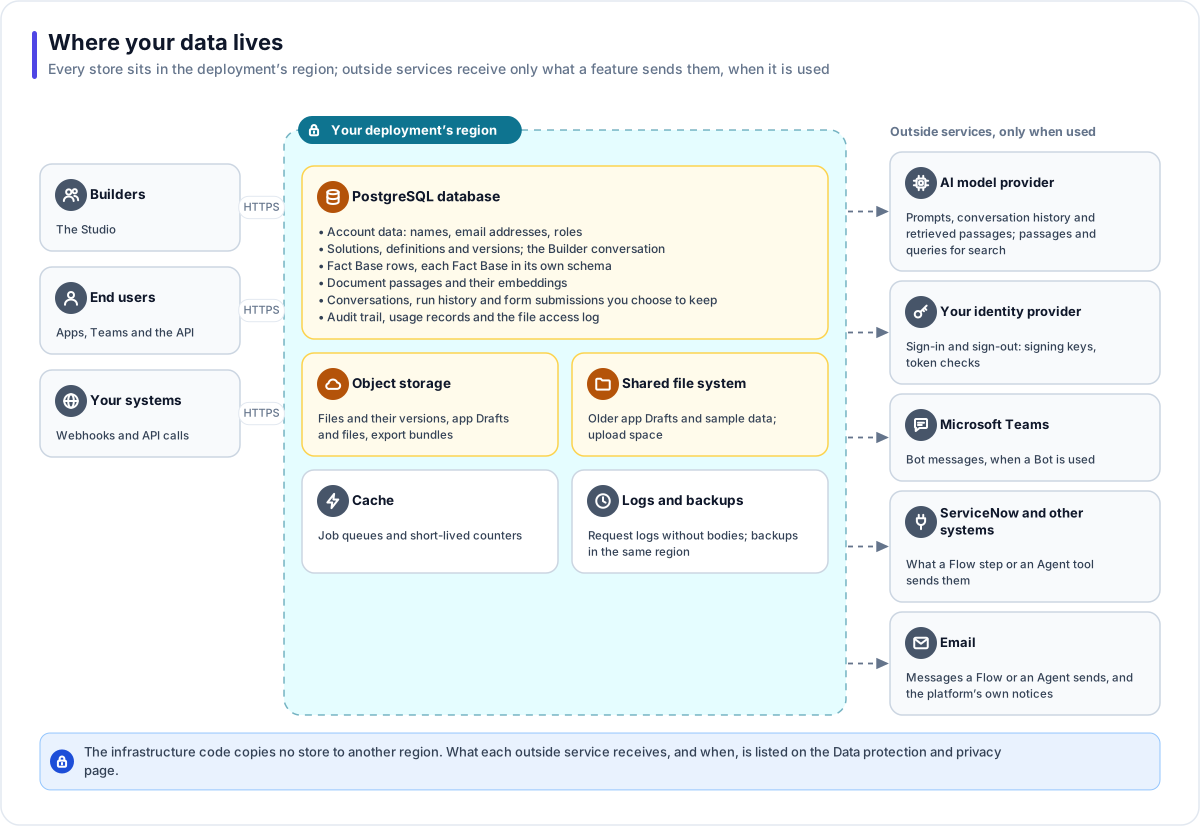
The data inventory
| Data | Where it lives | Who can see it | How long it is kept | Export or deletion |
|---|---|---|---|---|
| Account data: a person's name, email address and identity-provider subject; their workspace memberships and roles; invitations (an email address and a hash of the invitation) | The platform database | The person; workspace members on the Members page, which owners and admins manage; Flexday AI staff in the staff console | A person's record has no automatic deletion: it stays even after they leave every workspace. Removing a member marks the membership removed | A person's record is shared across the workspaces they belong to, so it is not part of a workspace's export or purge, and the platform has no function that erases one; ask Flexday. |
| Sign-ins to what you build: for each Identity, the people who signed in (subject, email address, issuer, sign-in counts, and what their latest sign-in verified about them: name, whether the email is verified, its domain, their groups and the sign-in's other claims, never the token itself), its members and their access tags, and email invitations waiting for someone's first sign-in | The platform database | The Solution's builders. A Flow the Identity runs at sign-in or for an existing member receives the same details, and its run history keeps them | Until the Identity or its Solution is deleted; the sign-in details are replaced at each sign-in | Deleted with the Identity or the Solution |
| Workspace content: Solutions, resource definitions and versions, the Builder conversation (your messages and the Builder's working history), chat attachments, briefs and notes | The platform database; attachments in object storage | People with access to the Solution | Until the Solution is deleted; a Builder conversation can be cleared with New chat, but the audit trail keeps a copy of each message, and of the Builder's working history as it stood when cleared, until the workspace is purged | A Solution export carries every resource, and the Builder conversation when you include history |
| Business data: Fact Base rows, documents (their text passages and embeddings), files and their versions, and form submissions where storage is switched on | Fact Base rows in their own database schema; passages and embeddings in the database; files in object storage | Under Solution access, Fact Base roles and row policies, and audience tags on documents and files | Until deleted. A deleted file is hidden, but its stored versions are kept until its File Store's retention window passes (with no window set, they are kept), unless Also purge the stored bytes is ticked, which deletes every version at once. Form submissions are removed after the workspace's retention window (30 days by default). | Rows can be deleted by a saved query or cleared; documents and files can be deleted; a Solution export can carry rows, documents and files |
| Conversations: Agent conversations (every turn, including tool results, plus the end user's reference, email address and name as their sign-in gave them, and any memory notes), Teams conversation records (user, name, the claims Teams verified about them, and consent), message delivery records (status only, no message text), and Flow run history (each step's input and output) | The platform database | The Solution's builders, in an Agent's Sessions and a Flow's runs; end users see only their own conversation history | No time-based deletion; removed with the Agent, the Bot, the Flow, the Solution or the workspace | A Solution export can carry run and conversation history |
| Operational records: usage records (model and token counts, never the prompt or answer text), the audit trail (who changed what, with the values), the file access log (who read which file and through what: the Studio, an app, a Flow or an Agent, with the browser's user agent), query statistics (counts and durations, never the query text), API call records (for each Flow started through a gateway endpoint, the caller's sign-in reference and the Flow's response), and application logs (one line per request with method, path, status and duration, plus warnings and errors that can name a resource or a signed-in person's identifier; never request bodies) | The platform database; logs in the cloud provider's log service | Usage is on the Usage pages (in a Restricted workspace, members see only the Solutions shared with them); workspace admins read the audit trail through the platform's API | The audit trail and usage until the workspace is purged; the file access log for the workspace's retention window; query statistics until their Fact Base or Doc Base is deleted; API call records until their endpoint is deleted; application logs 365 days in Flexday's AWS environments | Usage exports as CSV from the Usage page |
Important
There is no self-service function that finds, exports or erases everything held about one person across a workspace. Handling a data-subject request means finding that person's data in each Solution and deleting it there. Fact Base rows, documents and files can be deleted one at a time, but a single Agent conversation or Flow run cannot: it goes only with its Agent, Flow or Solution. Earlier values of audited records stay in the audit trail until the workspace is purged. Plan that process before personal data goes in.
When a workspace is offboarded
An owner can offboard a workspace. Access stops at once, running work is cancelled, a final export is started, and the workspace is purged after its retention window (30 days by default), during which it can still be restored. A Flexday AI super administrator can also purge an offboarded workspace before its window ends. The purge drops every Fact Base schema, deletes the stored files (a failed delete is logged and the purge carries on) and every workspace record, the audit trail last, and destroys the workspace's own encryption key. It does not remove: the person records shared with other workspaces, people's sign-in accounts held by the identity provider, a Teams app registered in your Microsoft tenant, application logs (kept for their own retention, 365 days in Flexday's AWS environments), or backups, which expire on their own schedule (database backups after 7 to 30 days, earlier versions of stored objects after 30 days, and shared-file-system backups under the cloud provider's backup plan).
What reaches an AI model provider
| Feature | What is sent | When |
|---|---|---|
| The Builder | Your messages and attachments, the Builder's working history for the Solution, its brief and notes, up to five sample rows per table of attached data, the results of the read-only queries it runs against the Solution's Fact Bases (at most 20 rows each), and the passages its Doc Base searches return | Every Builder turn |
| Naming | The start of a build request, to name a new Solution; a Solution's title, to name resources it creates | When a Solution or resource is named |
| Fact Base definition | The sample data you supplied | When a definition is inferred |
| Data Portrait | Profile: the results of read-only queries, at most 20 rows each. Ontology: the definition and the profile, with no database access. | When a portrait is built |
| Agents | The instructions and intents, memory notes, the recent conversation (20 exchanges by default) and tool results, including retrieved passages and query results | Every Agent turn |
| Guardrails | The message, for a blocked topic described in words and for moderation where it is switched on | Each message, when those checks are configured |
| Search | Each document passage (with its document's name and heading) when it is indexed, and each search query | Indexing and every search |
| Evaluations | Each test case, through the Agent, and the answer to the judging model for a rubric | When an evaluation runs |
| Flows | An AI generate step's prompt, including any run data the step puts into it | Each time the step runs |
| Studio suggestions | An Agent's instructions or description, to suggest intents and phrases; a form field's label, example and format, to suggest its rules; a Fact Base table's definition with your answers, to suggest changes; a Fact Base's current and intended structure, to plan a schema change; an attached spreadsheet's column names, to match them to a Fact Base | When you ask for a suggestion or a plan |
The provider is chosen per use: Anthropic Claude models by default, or GPT models through Azure AI Foundry where a deployment is configured for them. Workspace owners and admins can choose the model on the AI models page for the Builder, Agents, the evaluation judge, Fact Base definitions, Data Portraits and the default for search embeddings, and an Agent can name its own. Everything else, including topic checks and moderation, naming, Flow AI steps and Studio suggestions, uses the deployment's default provider. As Flexday's AWS environments are configured, Claude models come from Anthropic's API, and an Azure AI Foundry resource provides the search embeddings (document passages and search queries) and the GPT models a workspace or an Agent can choose. See AI models.
Services the platform can call
These are the outside services the platform's code can call, and when. They are not a contractual list of Flexday's sub-processors, which you should request from Flexday.
| Service | Used for | When |
|---|---|---|
| Anthropic API | Claude models | Every AI feature except search embeddings, on the default configuration |
| Azure AI Foundry | GPT models and embeddings | Where a deployment is configured for it |
| OpenAI or Voyage AI | Embeddings | Only where a deployment is configured for them |
| The cloud provider (on AWS: S3, Cognito, SES, Secrets Manager, KMS, CloudWatch) | Storage, sign-in pools, email, secrets, logs | Always, in an AWS deployment |
| Azure Key Vault | The deployment's own secrets, and Secret Variables where the deployment is set to seal them there | Always, in an Azure deployment |
| Microsoft Bot Framework, Microsoft Graph and Azure | Teams messages, bot registration and publishing to your Teams catalog | Only when a Bot is used |
| ServiceNow | Your instance | Only when an Integration step runs |
| Your identity providers | Checking sign-ins and tokens (discovery, signing keys, token exchange, and asking the provider who an opaque token belongs to, as GitHub requires), and revoking a person's refresh token when they sign out of an app, where the provider supports it | When people sign in, use an app whose Identity checks each token with the provider, and sign out |
| Your mail server, or the platform's mail relay | When a Flow or an Agent sends one, and for the platform's own messages: invitations, temporary sign-in details, access requests, and notices when Flexday support enters a workspace or a test session acts as an app's member | |
| Addresses your Solutions call | HTTP steps, Agent HTTP calls, file fetches and Doc Base website crawls | When those run |
Separately, the apps the Builder writes are instructed to load their libraries and fonts from public content delivery networks (cdn.jsdelivr.net, cdn.tailwindcss.com and fonts.googleapis.com), and a map's tiles from tile.openstreetmap.org. The browsers of people who open such an app contact those services directly.
Data residency
In Flexday's AWS environments, every store a deployment creates (the database, object storage, the shared file system, the cache and the backups) is in one region, and the infrastructure code defines no copy to another region. All of those environments, including Flexday SaaS, are in US East (N. Virginia). The Azure infrastructure code, as configured, keeps no copy in another region either, but it can place the database in a different region from the rest of a deployment, and Flexday's Azure development environment does: its database is in East US 2 and everything else in East US. Browsers reach Flexday's development, internal production and production AWS environments through the content delivery network's edge locations in North America and Europe, and the test environment directly.
Calls to an AI model provider, an identity provider or a connected application go where that service runs. Where data must stay in a country or region, ask Flexday which hosting regions it offers and where each model provider processes requests. A dedicated deployment runs in the region you choose.
Privacy by design
- Personal-data guardrail. An Agent can detect card numbers (checksum-verified), US social security numbers, email addresses and US-format phone numbers in a message and warn, mask or block. It is off until you switch it on. Set to mask, it masks the stored message too; set to mask or block, it masks personal data in the Agent's reply, as shown and as stored. A message it blocks is refused, but kept in the conversation as it was sent.
- Audience tags. Documents and files can be limited to the people whose sign-in carries a matching tag, in search results, citations, previews and downloads.
- Form storage is opt-in. Answers to a form are kept as a separate record only when storage is switched on for it; otherwise they stay only in the conversation or the Flow run they belong to.
- Email bodies. A Solution's email rules can keep message bodies out of Flow run history; without that, a stored body is cut to 2,048 characters by default.
- Secrets never exported. Credentials and secret values are left out of every export.
- Your own history only. In a generated app, a signed-in person can see their own past conversations with an Agent and no one else's.
- Reads are logged. Downloads, previews and listings of files, and opening or listing stored form submissions, are recorded with who read them. A Solution export that includes history also carries stored submissions.
- Request logs without bodies. Request bodies are not logged, and credentials in web addresses are removed before a request is logged.
What stays with you
- Deciding what personal data goes into each Solution, and on what lawful basis.
- Setting retention windows on File Stores, and deleting data you no longer need.
- Handling data-subject requests, Solution by Solution.
- Choosing the model provider for each use, and reviewing its terms with Flexday.
- Requesting Flexday's data processing agreement and sub-processor list (see the due-diligence checklist).