Architecture
Deployment models
Run Flexday AI as a workspace on Flexday-operated cloud, or privately in your own AWS or Azure environment, and see what is shared, dedicated or yours.
- Everyone
- Functional users
Last reviewed
The same Flexday AI platform runs three ways. As Flexday SaaS, your organisation has a workspace on cloud that Flexday operates. As a private cloud on AWS or on Azure, the whole platform runs inside your own account or subscription, from the same container images. What changes is who operates each part, and where your data lives.
At a glance
- One platform, three homes. The same six services, built from the same code into four container images, in every model.
- SaaS is isolated by the database. Workspaces share infrastructure, and PostgreSQL row-level security keeps each workspace's Solutions and their contents invisible to every other.
- Private cloud is yours. Compute, database, storage, keys and model-provider accounts sit in your cloud, under your controls.
- Sign-in is your choice. On Flexday SaaS and on AWS, use pooled sign-in, a dedicated user pool or your own single sign-on over OpenID Connect or SAML; the Azure reference deployment signs everyone in through your Entra ID tenant.
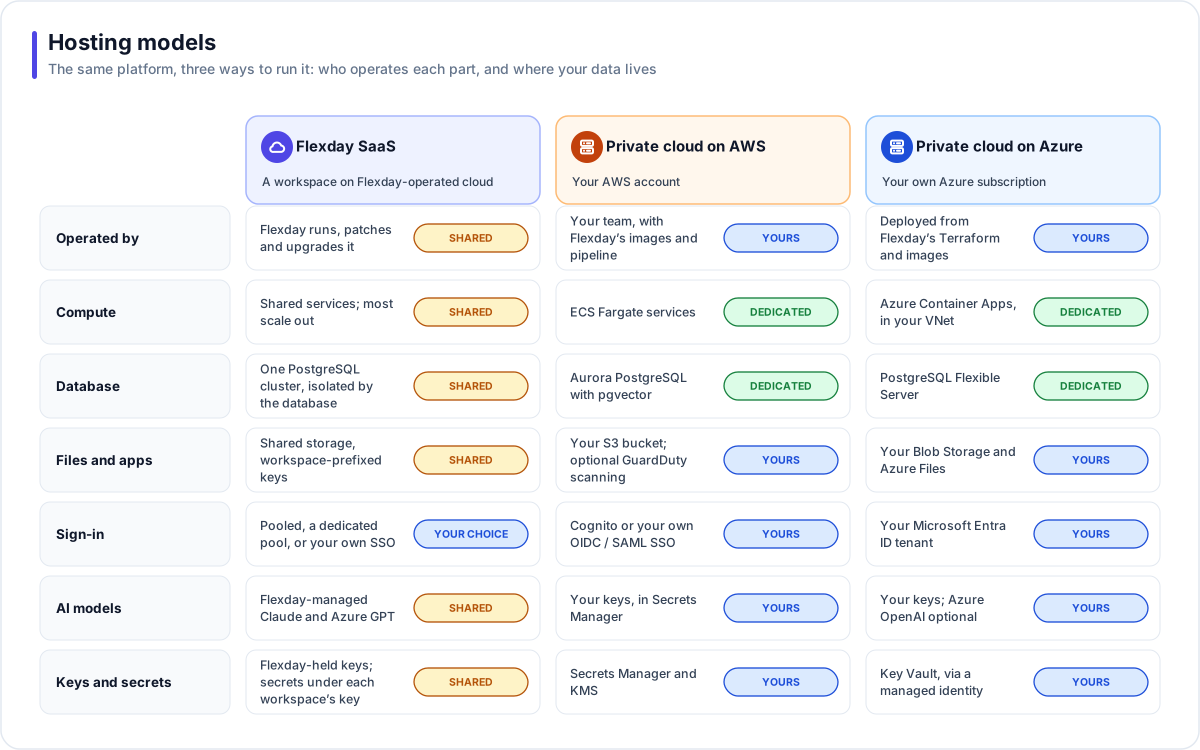
Comparing the models
| Flexday SaaS | Private cloud on AWS | Private cloud on Azure | |
|---|---|---|---|
| Operated by | Flexday runs, monitors, patches and upgrades the platform. You manage your workspace, members and Solutions. | Your platform team, in your account, with Flexday's container images and deployment pipeline. | Designed as one dedicated deployment per client, in its own subscription, from Flexday's Terraform and images. Today it runs as Flexday's own development environment. |
| Compute | Shared platform services; most run one to three copies, and the Studio API runs as one. | Dedicated ECS Fargate services. | Dedicated Azure Container Apps, integrated with your virtual network. |
| Database | One PostgreSQL cluster; each workspace's Solutions and their contents are kept apart by row-level security; each Fact Base has its own schema. | Aurora PostgreSQL with pgvector, in your network, encrypted at rest. | Azure Database for PostgreSQL Flexible Server, normally reached through a private endpoint; the vector extension must be on the server's allow-list before the first release, which the reference Terraform does not add. |
| Files and apps | Shared object storage; every key is prefixed with the workspace. | Your S3 bucket, with optional GuardDuty malware scanning. | Your Blob Storage for deployed apps and files, and Azure Files for app Drafts. |
| Sign-in | Pooled sign-in, a dedicated user pool for your workspace, or your own SSO. | Amazon Cognito user pools or your own SSO. | Your own Microsoft Entra ID tenant. |
| Addresses | Studio at app.<domain>/t/<workspace>; your apps at <workspace>.apps.<domain> where the deployment publishes workspace addresses; TLS managed by Flexday. | Your own domain, with certificates issued and renewed by AWS Certificate Manager. | Your own domain, with certificates issued and renewed by Front Door. |
| AI models | Flexday-managed access to Claude, and Azure GPT where offered; usage and cost metered per workspace and Solution. | Your own model-provider keys, held in Secrets Manager. | Your own keys; Azure OpenAI for GPT models and embeddings is optional. |
| Keys and secrets | Flexday-held keys; Secret Variables sealed, as the infrastructure code is configured, in Flexday AI's encrypted storage under each workspace's own key. | Secrets Manager and KMS. | Key Vault, read by the services with a managed identity. |
| Upgrades | Rolling deployments: most services start their new copies before the old ones stop, and the Studio API restarts with a short pause. | You schedule image rolls; when the API image changes, a migration step runs before services update. | Each release runs the migrate job first, then moves each changed Container App to its new image. |
Choosing a model
| If you need | Consider |
|---|---|
| The fastest start and no infrastructure to run | Flexday SaaS |
| Your data to stay inside your own cloud account, with keys created in that account | Private cloud on AWS or Azure (the Azure reference deployment uses Microsoft-managed keys) |
| To use your existing Entra ID tenant and Azure AI Foundry, with a Key Vault in your subscription | Private cloud on Azure |
| To use Cognito and Secrets Manager in your own AWS account | Private cloud on AWS |
| Secrets held in a vault in your own cloud account | Private cloud on AWS or Azure (the shared service has no option to point at your own vault) |
Tip
In SaaS you can still bring your own identity provider for Studio, your own identity providers for the apps you build (through Identities) and your own mail server. Each is a setting, not a separate deployment. Where Secret Variables are sealed is not one of them: it is set once for the whole deployment.
Note
A private cloud on Azure is designed as a dedicated, single-client deployment: one copy of the platform per client, in that client's own subscription, signing in against that client's own Entra tenant. Today it runs only as Flexday's own development environment.
Where Flexday runs it
Flexday SaaS runs on the private-cloud-on-AWS shape: ECS Fargate, Aurora PostgreSQL 17 and the surrounding managed services. Flexday also runs a development environment of the Azure deployment in its own subscription, where the pattern is proven before it is applied to a client's. See Reference deployment on AWS and Reference deployment on Azure for the service-by-service picture.
Tip
Evaluating Flexday AI? Deployment options and data residency compares the options from a buyer's side: what you control in each, and where your data lives.