Components
Template
A working copy of a Solution that people start from. Using one copies real resources into a new Solution as a background job, with no AI build in between.
- Everyone
Last reviewed
A Template is a working copy of a Solution that other people can start from. It owns its own full set of resources: Fact Bases (with their rows, or as structure only, the default when publishing), apps, Doc Bases, File Stores, Flows, Agents and gateways. Publishing copies a Solution into a new Template, and using a Template copies it into a new Solution. Neither copy keeps a link back to its source.
Note
In one sentence: a Template turns one Solution that works into many, and a new Solution made from it arrives safe rather than live.
Why it matters
- Start from something that already works. A new team starts from a working app, data and automations instead of a blank page.
- No AI cost to copy. Using a Template copies resources directly; no model is called.
- Safe by default. A new Solution arrives with apps in draft, Flows and Agents unpublished, and credentials blank, so no app is live and no automation runs until someone reviews it. The app's read queries are wired at once on a new gateway with no Identity attached, so they answer without sign-in until one is attached.
- A curated catalog. Flexday AI publishes Templates to a global catalog that every workspace can browse, as frozen, versioned releases.
Key concepts
| Term | What it means |
|---|---|
| Template | An independent copy of a Solution's resources that people browse, preview and build from. |
| Publish as Template | Copies a Solution into a new Template. The Solution and its data are never changed. |
| Use this template | Names a new Solution, then copies the Template into it as a background job. |
| Workspace Template | Visible to every member of the workspace that published it. There are no private Templates. |
| Global catalog | Templates Flexday AI publishes for every workspace. Each release is a frozen, read-only snapshot. |
| Version | major.minor.patch, starting at 1.0.0. A release bumps it. |
| Live preview | Browse a Template's app with its real data. Anything that would send, write or run is refused. |
How it works
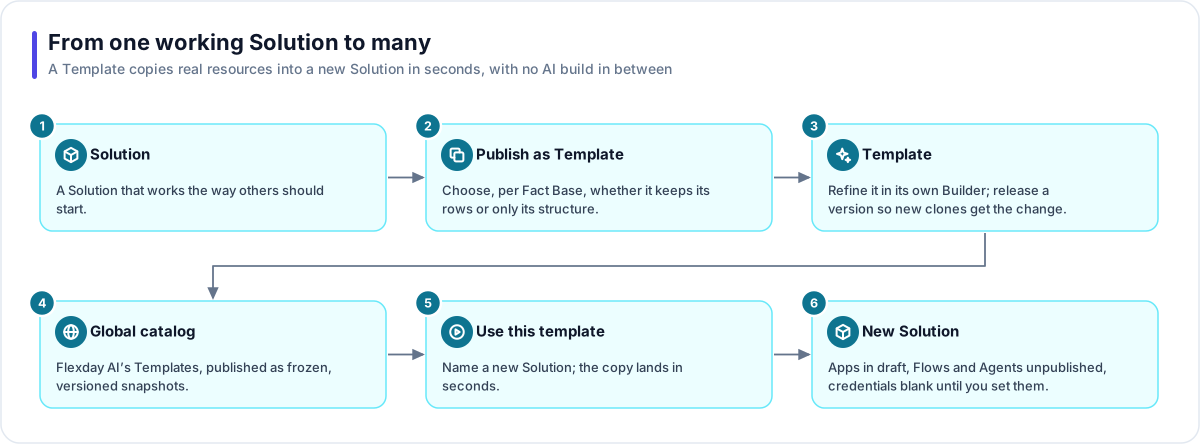
- Solution. Get a Solution working the way others should start: its data, app, Flows and Agents.
- Publish as Template. Name it and decide whether the Template keeps the data: Publish without the sample data is on by default and copies every Fact Base's structure with no rows; turn it off to copy every Fact Base's current rows. A preflight lists warnings, such as unapplied schema changes and the Variables each user will need to supply.
- Template. A background job copies the Solution's resources and names anything it leaves out, such as an Identity that is not a username-and-password one, or an Agent or Flow whose references cannot be resolved. You can refine the Template in its own Builder. A new copy takes the Template's apps as they were last deployed (at publish or at the latest release), so release a version to pass on app changes; its data, Flows and Agents are copied as they stand.
- Global catalog. Flexday AI can publish a Template's release to the global catalog as a frozen snapshot. Other workspaces see only those snapshots, never a live Template.
- Use this template. Someone names a new Solution and a background job copies the Template into it; the Studio shows its progress, and the copy carries on if the tab is closed.
- New Solution. The new owner enters credentials, sets Variable values, reviews the app, attaches an Identity and creates any Flow, Agent or file endpoints the app needs, then publishes it.
What a new Solution receives
| Resource | How it arrives |
|---|---|
| Fact Bases | The Template's current rows, or structure and empty tables if it was published without data. |
| Apps | Every app, with the files the Template last deployed and its Fact Base links, in draft with neutral branding. A new gateway serves the app's read queries; endpoints for Flows, Agents and file uploads are not copied, and no Identity is attached. |
| Flows and Agents | Unpublished drafts. A Template's own Flows never run and its Agents never answer. |
| Connections and Identities | Copied with their names and non-secret settings, with every secret blank. A Template carries only username-and-password Identities, and the copies are not attached to the new app's gateway. |
| Variables | Definitions and non-secret defaults. Secrets and required values are yours to supply. |
| Webhook Flows | A new address and signing secret at every copy, so the source's callers cannot reach it. |
A catalog release
A catalog release moves from Building to Live, becomes Superseded when a newer release goes live, and is removed by the next catalog publish or withdrawal once 2 hours have passed. A release can also be Withdrawn, which hides it from every workspace at once. Solutions already made from a release are independent copies: a withdrawal or a new release never changes them.
Where you work with it
Templates in the Studio sidebar lists your workspace's Templates and the global catalog. A Template's page opens on Overview: its version, a live preview, Use this template, Browse this template and Edit template, which opens its own Builder for people who can edit it. Its resources, Brief, Variables, Usage and History are in the same menu, and Release publishes a new version. Publish a Solution as a Template from the Solution's own menu. Templates are switched on per deployment; where they are off, the Templates page cannot load any.
Works with
- Solution: the source a Template is published from and the destination of every copy.
- Fact Base: copied as last provisioned, with rows or as structure only.
- LaunchPad, Flow and Agent: a new Solution receives them as drafts; a Template's own copy of an app is deployed when it is published, so its preview works.
- Connection, Identity and Variable: copied without their secrets.
- Solution export and import: the better fit when you want to move one Solution rather than offer a starting point. See Reuse and portability.
Governance and limits
| Area | What applies |
|---|---|
| Boundary | A workspace Template stays in its workspace. Other workspaces see only published catalog snapshots, never a live Template, its Builder chat or a stored credential. |
| Access | Publishing needs edit rights on the Solution. Members can refine and delete a Template; renaming one needs an admin. Only Flexday AI publishes to the global catalog. |
| Versions | Every publish creates a new Template at 1.0.0. A release bumps major, minor or patch. A catalog snapshot can never be edited. |
| Safety | Stored credentials never reach a new Solution made from a Template. A global catalog release keeps a complete copy, credentials included, inside the workspace that published it, and copies made from it receive none of them. A failed publish removes the half-built Template. A failed copy removes what it copied, but the new Solution it was copying into stays, and a copy interrupted by a server restart can leave some resources behind. Publishing as a Template or using one never modifies the source. |
| Limits | Up to 200 Variables per Template. Preview links last 15 minutes. One catalog publish per Template at a time. |