Architecture
Reference deployment on AWS
The AWS services a private Flexday AI deployment uses, the same shape Flexday runs on ECS Fargate, and how traffic and data flow between them.
Written for
- Technical
Last reviewed
A private deployment on AWS runs the six Flexday AI services on ECS Fargate in your own account, with Aurora PostgreSQL, ElastiCache, S3 and the surrounding managed services. It mirrors the environments Flexday itself runs: one region, private subnets for the application and the data, and the edge in front.
At a glance
- Everything inside your account. Compute, database, cache, storage, keys, sign-in and email all run in your AWS account and region.
- Managed services throughout. ECS Fargate for compute, Aurora for PostgreSQL, ElastiCache for Redis; the one server is a small host for reaching the database, which needs routine patching.
- Private by default. Services and data stores sit in private subnets; outbound calls leave through a NAT gateway.
- Three services, one image. The Studio API, the worker and the gateway are one image with three entry points.
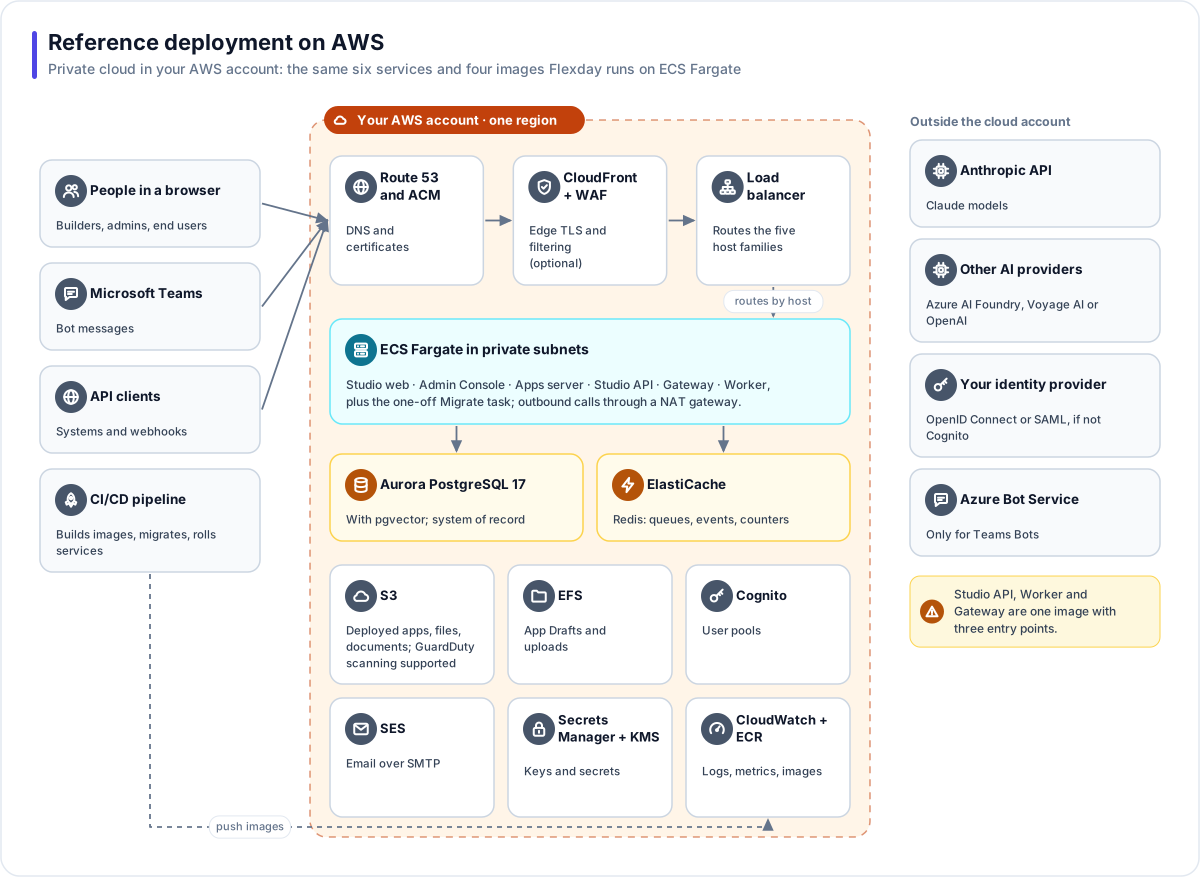
The services
| Area | AWS service | Role |
|---|---|---|
| DNS and certificates | Route 53, AWS Certificate Manager | Records and TLS certificates for your domain, including the wildcard for workspace app addresses. Queries to the deployment's public zones are logged to CloudWatch Logs and kept 365 days. |
| Edge | Amazon CloudFront (optional) and AWS WAF | Edge TLS and request filtering in front of the load balancer, which has web application firewall rules of its own. |
| Load balancing | Application Load Balancer | Routes the five host families to the right service. |
| Compute | Amazon ECS on AWS Fargate | Studio web, Admin Console, Apps server, Studio API, Gateway and Worker, plus the one-off Migrate task, in private subnets. |
| Database | Amazon Aurora PostgreSQL 17 with pgvector | The system of record, one schema per Fact Base, and document search. |
| Cache and queues | Amazon ElastiCache for Redis | Job queues, live events, rate counters. |
| Object storage | Amazon S3 | Deployed apps, files and documents, with workspace-prefixed keys. The buckets refuse any request not made over TLS, and their cross-origin rule admits large browser uploads from the Studio, the shared apps address and every workspace apps address. |
| Shared file system | Amazon EFS, encrypted | Older copies of app Drafts and uploaded sample data, written before both moved to object storage and still read until they are migrated, plus temporary upload space. |
| Malware scanning | Amazon GuardDuty Malware Protection for S3 (supported; not switched on in the reference configuration) | When it is switched on, an upload is served only after a clean verdict. |
| Sign-in | Amazon Cognito | User pools: shared, per workspace, or per Solution for app end users. |
| Amazon SES | Sign-in and Flow email over SMTP. | |
| Keys and secrets | AWS Secrets Manager, AWS KMS | Database passwords, provider keys, the platform master key, and encryption at rest. A separate KMS key and a role limited to one workspace per session are created for Secret Variables, and stay unused until the deployment is set to seal them in Secrets Manager. |
| Operations | Amazon CloudWatch, Amazon SNS, Amazon ECR | Logs, metrics and alarms per service, with alerts by email; the four container images with immutable tags, scanned when pushed. |
Outside the account
| Service | Needed for |
|---|---|
| Anthropic API | Claude models for building, Agents and Flows |
| Azure AI Foundry, Voyage AI or OpenAI | GPT models or embeddings, where you use them |
| Your identity provider | OpenID Connect or SAML sign-in, if not Cognito |
| Azure Bot Service | Only for Teams Bots |
How traffic flows
- People, Teams and API clients reach your domain over HTTPS. CloudFront (with WAF) terminates TLS at the edge, and the load balancer routes by host name.
- Services in private subnets reach Aurora over encrypted connections, ElastiCache inside the private network (encryption in transit is a setting, off in the reference configuration), and S3 over HTTPS through the NAT gateway.
- Calls to AI providers, identity providers and Microsoft leave through the NAT gateway.
- A CI/CD pipeline builds the images that changed, pushes them to ECR, runs the migrate task when the API image changed, then rolls each changed service.
Operating notes
- Scaling. The gateway, the worker and the web apps scale between one and three tasks behind the load balancer and the queue. The Studio API runs as a single task.
- Redundancy. The reference configuration runs one Aurora instance and one Redis node. A second database instance and a multi-zone cache with automatic failover are settings, and so is a second NAT gateway, so each availability zone has its own way out (it adds a second outbound address). See Reliability and business continuity.
- Releases. When a release changes the API image, the migrate task runs first, holding a lock so only one copy runs; if it fails, no service rolls.
- Permissions after a release. The database permissions the gateway holds are applied by the migrate step. Rebuilding an image alone does not change them.
- Cognito pools. A dedicated pool per workspace can be created by Flexday's provisioning when a workspace is set up. Per-Solution pools for app end users are provisioned by operators, with self-registration switched off.