Components
Builder
The AI engine at the centre of Flexday AI. Describe what you want and it creates the data, app, queries, Flows, Agents and wiring, then keeps refining by chat.
- Everyone
- Technical
Last reviewed
The Builder is the engine at the centre of Flexday AI. You describe what you want in plain English, and attach files if you have them. It decides what to create and creates it: a Fact Base loaded with your data, a web app, saved queries, Flows, Agents and the gateway wiring between them. Then you keep talking, and it changes what it built.
Note
In one sentence: the Builder is an AI agent with real tools that works inside one Solution (or one Template, which has its own Builder), through the same services and checks as the rest of Studio.
Why it matters
- From idea to working software in one conversation. No specification document, no hand-off, no build pipeline.
- The same rules as a person. Every tool the Builder uses goes through the same validation, audit trail, versions, quotas and Solution boundary as Studio.
- Mistakes caught by code, not by hope. Recurring model mistakes are caught by deterministic checks and fixes. To declare the work finished, the Builder must pass wiring and quality checks (it may set one aside when it does not apply) and list anything that is only a placeholder, and your "Done when" list is checked.
- Clear about what goes live. App changes wait in the app's Draft until you deploy them (the first real build deploys itself). Data, queries and gateway wiring change as the Builder works, and it can publish the Flows and Agents it builds. What takes effect, and when sets this out.
Key concepts
| Term | What it means |
|---|---|
| Turn | One message and everything the Builder does in response. A turn is a background job that carries on if you close the browser. |
| Two channels | Chat (sparse; where the Builder speaks and asks) and the Build log (one line per action, reads included). |
| Ask | The Builder can stop to ask you a question, or to have you confirm proposed Variables. The turn ends there; your answer (or Done or Dismiss on the Variables) starts the next turn, which carries on from the same conversation. |
| Brief | Your pinned instructions for the Solution, read every turn and never summarised away. |
| Finish gate | Deterministic checks the Builder must pass to declare the work finished: wiring and quality (it may set one aside when it does not apply), declared placeholders and your "Done when" list (it may not). A turn that ends on a question or a plain reply does not run them. |
| Draft first | The Builder writes the app's files to its Draft. The first real build deploys itself; later deploys are yours. |
| Reuse before create | A second Fact Base needs a stated reason, which the Builder tells you in chat. |
How it works
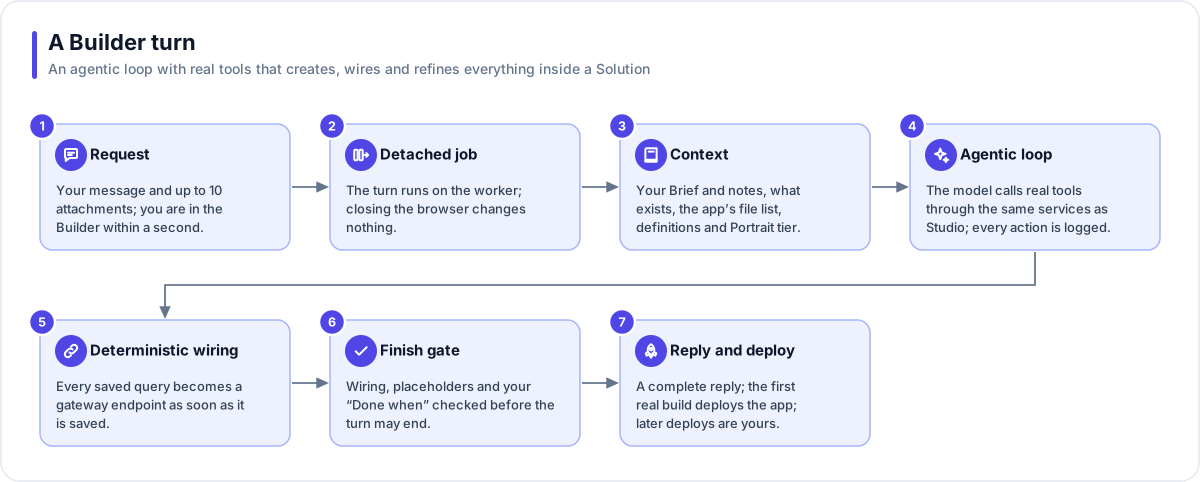
- Request. Your message and up to 10 attachments. From the Studio home page you go straight into the Builder: the Solution is created at once and the turn starts in the background.
- Detached job. The turn is saved and runs on the worker. Closing the browser changes nothing, and a message you send mid-turn is queued and picked up.
- Context. Your Brief and notes, a list of what already exists, the app's file list (read on demand), the Fact Base definitions and the richest Data Portrait tier.
- Agentic loop. The model calls real tools through the platform's services. Every action is one Build log line, and chat bubbles appear only when the Builder speaks or asks.
- Deterministic wiring. Once the app exists, each read query the Builder saves becomes a gateway
endpoint straight away, named after the query (or
<fact base>.<query>when the Solution has more than one Fact Base), and the app is pinned to that gateway, so the preview works while the build is still running. Queries saved before the app existed are wired by the finish gate. A query that writes data is never exposed automatically: the Builder has to create its endpoint deliberately, with a role that can write. - Finish gate. When the Builder declares the work finished, its saved queries are wired, the app is checked for calls that point at nothing, a direct API path or a hard-coded address, wrong parameters and quality (any of which it may set aside when the check does not apply), placeholders must be declared, and your "Done when" list is checked.
- Reply and deploy. Every turn ends with a complete reply. The first real build deploys the app; later, a note reminds you of changes that are not deployed yet.
A turn ends when it finishes, when it asks you something (the question is headed Waiting for your reply, and your answer starts the next turn), when it reaches its step limit (say "continue" to pick up where it stopped), when you stop it (work kept, re-runnable) or when it fails (attachments kept, and the reply names the files it changed). An interrupted turn is re-queued and resumes from its record of completed tools.
What the Builder can create and change
| Area | What it does |
|---|---|
| Data | Create a Fact Base from samples or a schema; alter its schema (planned first, then applied exactly as planned); load, replace or clear data; start a Data Portrait profile. |
| App | Write app files, one per widget; save queries with parameters; connect Fact Bases; pin the gateway. |
| Automation | Create, save, publish and run Flows; create, check and publish Agents. |
| Knowledge and files | Create Doc Bases and add documents; create File Stores; make an app's uploads index themselves. |
| API | Create Flex Gateways, endpoints and Identities, and choose the Flows an Identity runs to set people's access tags (On sign-in and For existing members). |
| Settings | Read Variable keys (never values) and propose new Variables for you to confirm. |
What takes effect, and when
| How it lands | What it covers |
|---|---|
| Waits for you | Changes to the app's files stay in its Draft until you deploy: only the first real build deploys itself, and the Builder has no deploy tool. It never switches a Flow on, so a Flow does not start from its own trigger until you do. A Variable it proposes exists only once you click Done. While you have said "don't build yet", every tool that would change something is refused. |
| Asks you first | It will not replace the rows of a table your live app writes to unless you asked to reset that data, or answered yes to its question proposing it. |
| Applies straight away | Schema changes, data loads and clears, saved queries, gateway endpoints, Identities, and Fact Base roles and row policies. It can also publish the Flows and Agents it builds, and run a Flow to test it. It is told to describe a schema change or a data clear in the chat first, but it does not wait for your answer. |
Watching it work
| Surface | What you see |
|---|---|
| Chat | Sparse and customer-facing. Every turn ends with a full reply, plus a placeholder list or a "Done when" table when relevant. The Builder is told to answer questions about what exists without changing anything. |
| Build log | One line per tool call, reads included, so a reading phase never looks like a hang. A line that acts on a resource carries that resource's icon. |
| Preview | The app's Draft in a frame, reloading on every file write. The chat header shows how full the Builder's memory is and what it has spent on this Solution so far, for example "Memory 34% · $12.40 so far". |
Tip
Say "don't build yet" and the Builder will read and store what you sent without changing anything. List acceptance criteria under a "Done when" heading and the finish gate checks them.
Works with
- Solution: the Builder works inside one Solution at a time; a Template has its own Builder, which builds the same resources but cannot publish its Flows or Agents.
- Fact Base, LaunchPad, Flow, Agent, Doc Base, File Store, Flex Gateway and Identity: the resources it creates and edits.
- File Store: chat attachments live in a managed store, count against quota, go through malware scanning where the deployment has switched it on, and can be read again later.
- AI models: the Builder always runs on Claude models, and its spend is recorded per Solution.
Governance and limits
| Area | What applies |
|---|---|
| Boundary | Every tool goes through the same services as Studio, so validation, audit, versions, quotas and the Solution boundary all apply. |
| Access | Whoever may edit the Solution may run the Builder. One running turn per Solution. |
| Versions | App files go to the Draft; Flows and Agents are saved as drafts, and the Builder can publish them. A schema change is planned first and applies exactly that plan, once; the Builder is told to describe the plan to you, but it does not wait for your approval. |
| Safety | Deterministic checks and fixes for recurring model mistakes; "don't build yet" is enforced in code; the Builder is instructed to answer questions without changing anything; stored secrets are never shown to the model (listings say only whether one is set). |
| Limits | 10 attachments per message; a first request up to 200,000 characters; 40 steps a turn (20 more once); older memory is summarised past 300,000 tokens. Names carry a short type suffix (APP, DS, DP, AGENT, DOCS, FL, FG, ID, FILES). |