Components
Connection
A saved, encrypted credential for an outside system, lent to a Flow step only while it runs and never shown again.
- Everyone
- Technical
Last reviewed
A Connection is a saved credential for an outside system: an API token, an API key, a username and password, OAuth client credentials for a business application, or your own mail server's settings. You enter the secret once. Flow steps then refer to the Connection by name, and the secret is lent to a step only while it runs.
Note
In one sentence: a Connection keeps a credential sealed and out of sight, so a Flow can use it without anyone, or any export, ever seeing it again.
Why it matters
- Secrets stay out of workflows. A Flow names the Connection, not the password, so the credential never appears in a graph, a run history or an export.
- Rotate in one place. Replace the secret on the Connection and every step that uses it picks up the new one.
- Encrypted at rest. Credentials are encrypted with AES-256-GCM under keys that can be rotated.
- Contained. A Connection belongs to one Solution, and a step in another Solution cannot use it.
Key concepts
| Term | What it means |
|---|---|
| Kind | What the credential is for: a bearer token, an API key in a header, Basic authentication, OAuth client credentials (for an application), or SMTP (your own mail server). |
| Application | For an Integration: kind Application, then the application (ServiceNow today) and its authentication. |
| Write-only secret | You can set and replace it; nothing can read it back, not the API, not the UI, not an export. |
| Settings | The non-secret part, such as an instance address, a header name or a username. |
| Rotation | Saving a new secret replaces the old one, encrypted with the current key. |
How it works
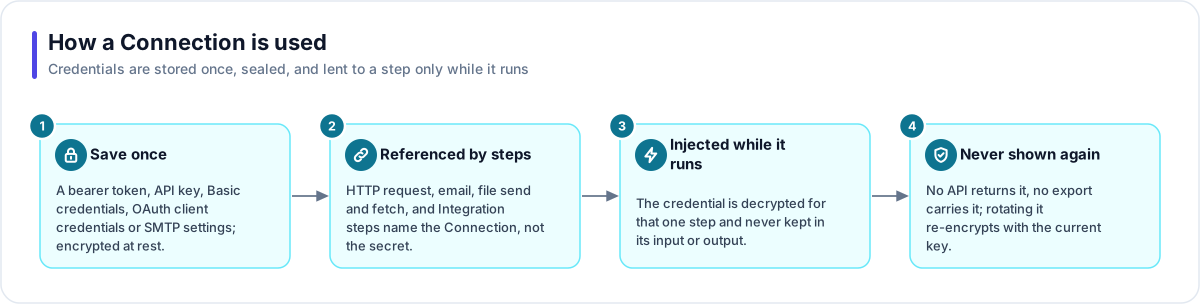
- Save once. Create the Connection in Studio with its kind, its settings and its secret. The secret is encrypted before it is stored.
- Referenced by steps. An HTTP request, a file send or fetch, a Send email step using your own mail server, or an Integration step names the Connection.
- Injected while it runs. When the step runs, the credential is decrypted for that step alone and added to its request. It is never kept in the step's input or output.
- Never shown again. No API returns the secret and no export carries it. A copy of the Solution, a Template clone or an import gets the Connection's name and settings with the secret left blank.
Which steps use which kind
| Step | Connection kinds |
|---|---|
| HTTP request | Bearer token, API key, Basic |
| File send and file fetch | Bearer token, API key, Basic |
| Send email with your own server | SMTP |
| Integration | Application (OAuth client credentials or Basic) |
A step and its Connection must match: an HTTP step cannot use an SMTP Connection, and an Integration step can use only a Connection made for the same application.
Tip
Use a Connection for a whole authenticated service. For a single token that goes in one header, a Secret Variable is often simpler.
Where you work with it
Connections are listed under Credentials → Connections. Creating one that exactly matches an existing Connection (same name, kind and settings) is refused, so you replace the secret on the one you have instead of making a near-duplicate.
Works with
- Flow: HTTP, file, email and Integration steps.
- Integration: the Connection carries the application, its authentication and settings such as the instance address and the duplicate-prevention field.
- Agent: an HTTP or email grant can use a Connection too.
- Template and Solution export: a Connection travels as a named, empty shell.
Governance and limits
| Area | What applies |
|---|---|
| Boundary | Owned by one Solution. A step that names another Solution's Connection is refused at run time. |
| Access | Creating or changing a Connection needs edit rights on its Solution. |
| Safety | AES-256-GCM encryption with rotatable keys. Decrypted only at execution, for one step. Never in a response, a log, a run history or an export. |
| Versions | Replacing the secret applies to the next step that uses it. |
| Portability | Exports, imports and Template clones carry the name and settings, never the secret. The import report lists every credential to enter again. |