Governance
Secrets and encryption
How Flexday AI encrypts data, seals credentials and Secret Variables, keeps each workspace's secrets apart, and never exports them.
- Everyone
Last reviewed
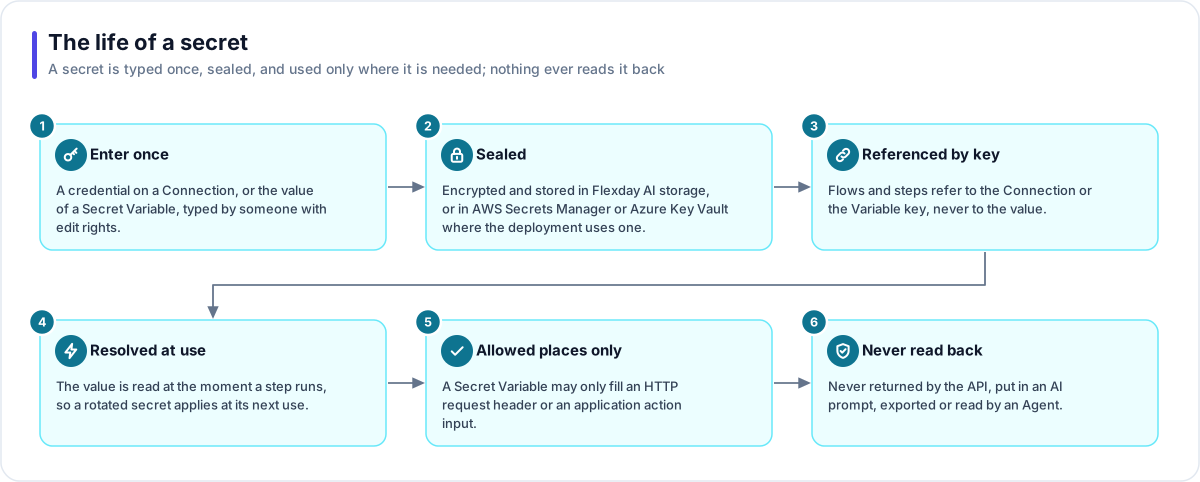
Solutions talk to other systems, so they need credentials: API keys, passwords, OAuth client secrets, tokens. Flexday AI treats every one of them the same way. It is typed once, sealed, used only at the moment a step needs it, and never read back, put in an AI prompt or exported.
At a glance
- Encrypted in transit and at rest. HTTPS on every public address and encrypted database connections; encrypted storage for databases, files and credentials.
- Credentials are write-only. You can set and replace a secret; nothing can read it back.
- Secrets are used late. A secret is read at the step that needs it, so a replaced or revoked one takes effect at its next use.
- Sealed where the deployment says. Secret Variables are sealed in Flexday AI's own encrypted storage under the workspace's own key, the default and what the infrastructure code sets for Flexday's environments, or in AWS Secrets Manager or Azure Key Vault where a deployment is set to use one.
- Secrets never leave your workspace. Exports, imports, Templates made from a Solution and Solutions cloned from a Template carry a secret's name, never its value. A Template published to the global catalog (only the deployment's default workspace can publish one) keeps a frozen copy, credentials included, inside that workspace; a workspace that clones it gets none.
Encryption
| Where | How |
|---|---|
| In transit | HTTPS at every public address; encrypted connections to the database and to object storage. In the AWS reference configuration the load balancer reaches the services over plain HTTP inside the private network, and the cache connection is not encrypted; encrypting it is a setting. |
| Databases and files at rest | The cloud provider's encryption: for the database with a key the cloud provider manages, and for stored objects and the shared file system with a key the deployment creates in its own account (on the Azure reference deployment, Microsoft-managed keys). Supplying your own key for them is not supported in this release. |
| Stored credentials | Every Connection credential is encrypted with AES-256-GCM under a key that belongs to your workspace, which a platform master key protects. |
| Sign-in secrets | Client secrets for app sign-in and Teams Bot credentials are sealed the same way and never returned. |
Two kinds of secret
| Connection | Secret Variable | |
|---|---|---|
| What it holds | A whole authenticated service: a token, a key, Basic credentials, OAuth client credentials or mail server settings | A single value, such as one API token |
| Used by | HTTP, file, email and Integration steps; Agent HTTP and email grants | HTTP request headers and Integration action inputs only |
| Stored in | Flexday AI's encrypted storage | Where the deployment seals secrets: Flexday AI's encrypted storage by default, or AWS Secrets Manager or Azure Key Vault |
| Read back | Never | Never; the screen shows Set, where it is stored and when |
Where Secret Variables are stored
Where Secret Variables are sealed is one setting for the whole deployment, never a workspace's choice. There is no setting for it in the Studio, and there is no option to point Flexday AI at your own vault. A dedicated deployment is how you keep secrets in a vault in your own cloud account.
| Deployment setting | Where Secret Variables are sealed |
|---|---|
| The default | Flexday AI's encrypted storage, sealed with the workspace's own key |
| AWS Secrets Manager, on an AWS deployment | Secrets Manager, through a role whose credential is scoped to one workspace at a time |
| Azure Key Vault, on an Azure deployment | Key Vault, reached with the services' managed identity, once the deployment sets the vault's address and gives that identity write access |
The infrastructure code for Flexday's AWS environments creates the Secrets Manager role and key that the AWS setting needs but leaves the default in place. The Azure Terraform sets no store and gives the services' identity only read access to Key Vault, so the Azure development environment uses the default too. As configured, Secret Variables in Flexday's environments are sealed in Flexday AI's encrypted storage.
Rules that apply on every deployment:
- Kept apart per workspace. On every store, the platform refuses to open a sealed secret that belongs to another workspace, and in Flexday AI's own storage each workspace's secrets are sealed with that workspace's key. With AWS Secrets Manager, every read and write also runs under a credential scoped to the workspace, so AWS itself refuses a request for another workspace's secret.
- No silent fallback. If the configured store cannot be reached, the services stop at start-up rather than quietly using a different one.
- Moving is safe. Each sealed value records where it was sealed, so when a deployment changes store, existing secrets stay readable and new ones go to the new place.
- No copy is kept. Outside its store the platform keeps no copy of a secret value, so a replaced value takes effect at its next use.
Where a secret may go
A Secret Variable may be used in exactly two places: an HTTP request header and an Integration action input. It is refused, at publish and again when a run starts, anywhere else: a message, an email, a web address, a request body or an Agent's instructions. Inside a run, the step's recorded input holds a placeholder, and the real value is added only as the request is sent.
Never exported, never shown
| Action | What travels |
|---|---|
| Publish as a Template, use a Template | The secret's key, type and label; the value is left for the new owner. |
| Publish to global catalog (the default workspace only) | A frozen complete copy, credentials included, kept inside that same workspace; a clone taken from the catalog carries no secret value. |
| Export a Solution | Names and settings; no password, key, token or secret value is written to the bundle. |
| Import a Solution | Credentials to re-enter are listed in the import report; platform secrets such as webhook signing secrets are created fresh. |
| API responses and AI prompts | Never contain a secret value; an automated check also refuses code that would write a credential to a log. |
What an evaluator can verify
| To confirm | Where to look in a trial |
|---|---|
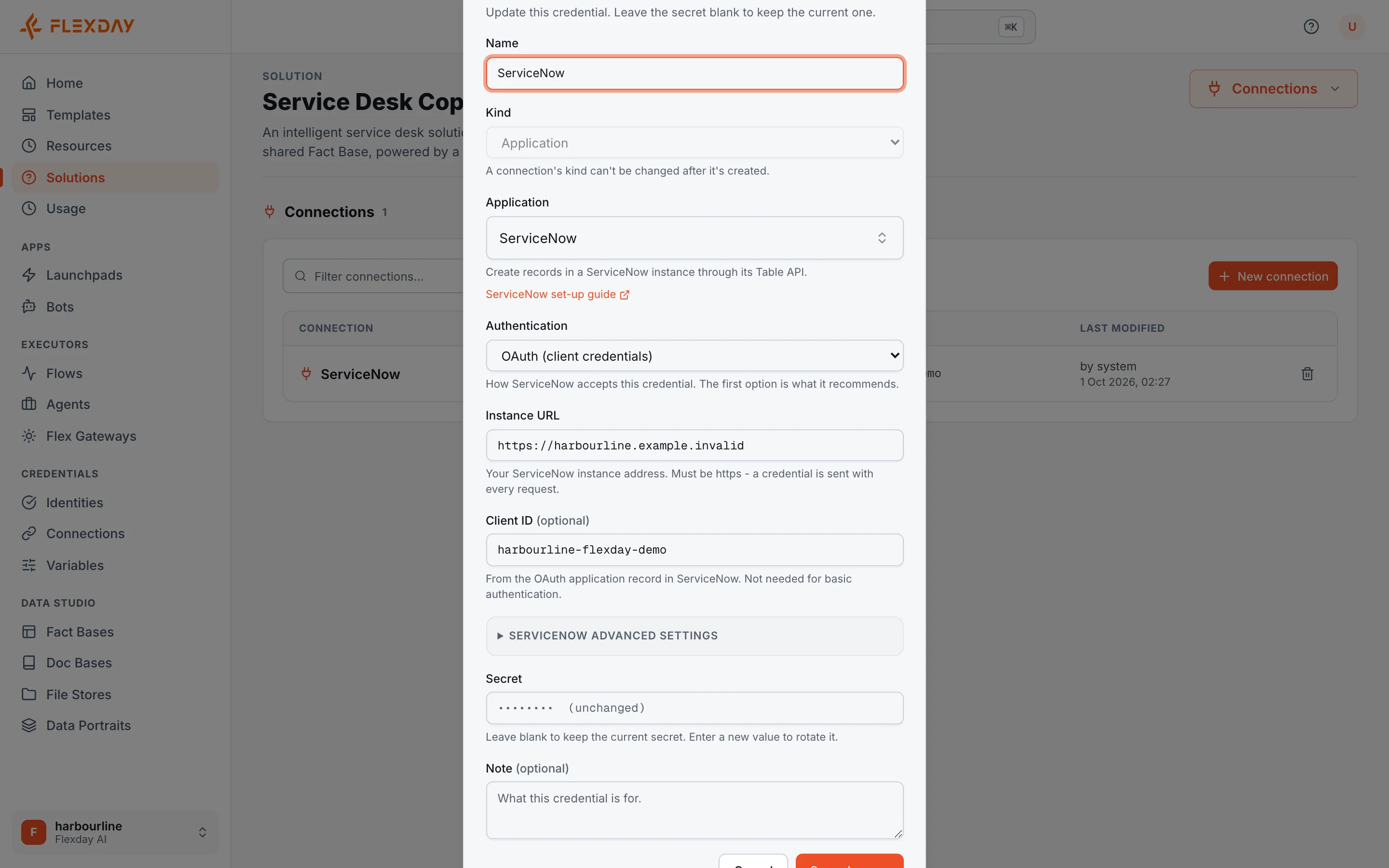
| That credentials are write-only | Edit a Connection: the secret field shows that it is unchanged, saving with it blank keeps the current value, and nothing displays the stored one. |
| Where Secret Variables are sealed | A Solution's Variables list shows a secret as Set, and its editor says which store holds it and when it was last set, never its value. |
| That secrets stay out of exports | Export a Solution and import the bundle: the import report lists every credential to re-enter. |
| How storage is encrypted | In a dedicated deployment, your cloud console shows the database's storage encryption and the key on object storage and the file system. For the hosted service, ask Flexday for the same evidence. |