Architecture
Reference deployment on Azure
How Flexday AI runs in your own Azure subscription: Container Apps behind Front Door, PostgreSQL Flexible Server, Managed Redis and Entra ID.
- Technical
Last reviewed
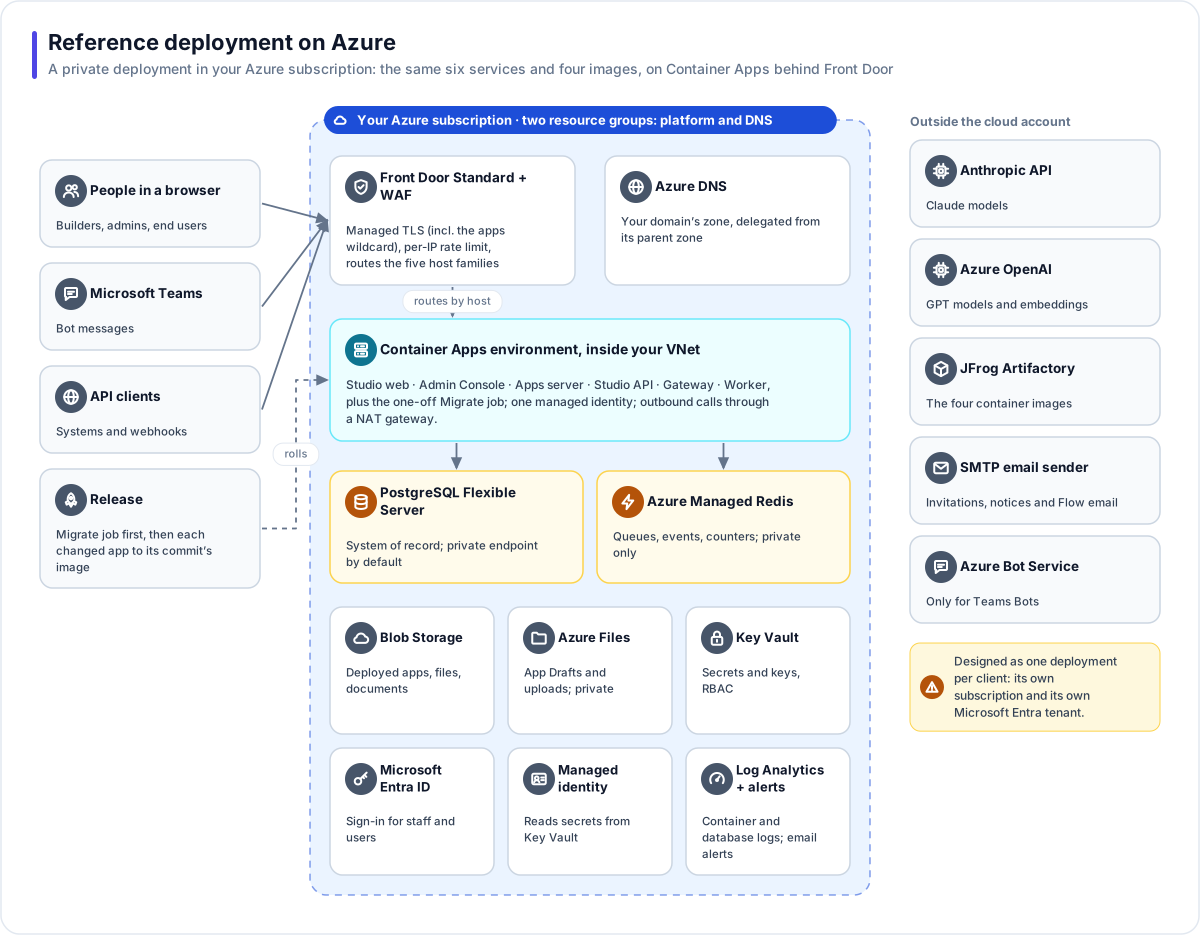
On Azure, Flexday AI runs as a dedicated deployment in your own subscription. The same six services and four container images run on Azure Container Apps, behind Azure Front Door, with Azure Database for PostgreSQL, Azure Managed Redis, Blob Storage and Azure Files, and Key Vault. Your people sign in with your own Microsoft Entra ID tenant. The whole stack is described in Terraform.
At a glance
- Designed as one deployment per client. Each client is meant to get its own copy of the platform, in its own Azure subscription, signing in against its own Entra tenant; a copy can still hold several workspaces. Today it runs as Flexday's own development environment.
- Serverless containers. Azure Container Apps runs the six services and the one-off migrate job, inside your virtual network, with scale rules per service.
- Private endpoints for the data. Redis, the file shares and, when it is in the same region, the database are reached through private endpoints. Outbound calls leave through a NAT gateway.
- Secrets live in Key Vault. The services read them with a managed identity (the file shares' account key is the one exception).
- Same application as AWS. The four images are built from the same code for each cloud; only their configuration differs.
The services
| Area | Azure service | Role |
|---|---|---|
| DNS | Azure DNS | The zone for your domain, delegated from its parent zone. |
| Edge and ingress | Azure Front Door Standard | The main way in: managed TLS certificates (including the wildcard for workspace app addresses), and routing of the five host families. On the apps address, /api/* goes to the gateway and everything else to the apps server. Caching is off. In the current configuration each service's own Container Apps address can also be reached directly. |
| Web application firewall | Front Door WAF policy, in Prevention mode | A rate limit of 300 requests a minute per visitor address, on the Studio, Admin Console, API and shared apps addresses; workspace app addresses are not yet covered. Microsoft's managed rule sets need Front Door Premium. |
| Compute | Azure Container Apps environment, integrated with your VNet | Studio web, Admin Console, Apps server, Studio API, Gateway and Worker, plus the Migrate job. |
| Database | Azure Database for PostgreSQL Flexible Server | The system of record, one schema per Fact Base, and document search. The platform's database migrations install the vector extension, so it must be on the server's extension allow-list before the first release; the reference Terraform does not add it. Encrypted connections are required. Backups are kept 7 days in the same region; a zone-redundant standby is a setting, off as configured. |
| Cache and queues | Azure Managed Redis | Job queues, live events, rate counters. Encrypted connections; no public access. |
| Object storage | Azure Blob Storage | Deployed apps, File Store files and documents, with versioning and soft delete. |
| Shared file system | Azure Files | Two shares holding older copies of app Drafts and uploaded sample data, written before both moved to object storage and still read until they are migrated, plus temporary upload space. |
| Secrets | Azure Key Vault, with role-based access | Database passwords, model-provider keys, encryption and signing keys, and registry credentials. |
| Service identity | A user-assigned managed identity | Lets every service read its secrets from Key Vault. The services reach Blob Storage with the storage account's key, kept in Key Vault, because signed upload links need it; the Azure Files shares are mounted with their account key. |
| Sign-in | Microsoft Entra ID | An app registration, created by the Terraform, for both builders and Flexday staff. |
| Monitoring | Log Analytics workspace, metric alerts, action groups | Logs from every container and from the database, kept 30 days as configured; email alerts on crash loops, a rising server-error rate, high CPU on any service, database CPU, storage and connections, Redis CPU and memory, and slow Front Door origins. |
| Admin access | Azure Bastion with a Windows jump host (optional) | Private access to the database, Key Vault and storage when needed. |
Outside the subscription
| Service | Needed for |
|---|---|
| Anthropic API | Claude models for building, Agents and Flows |
| Azure OpenAI (Azure AI Foundry) | GPT models for Agents and embeddings for Doc Bases, where you use them |
| JFrog Artifactory | The four container images for Azure deployments |
| An SMTP email sender | Invitations, notices and Flow email, through your existing mail sender (Entra ID shows its own sign-in pages) |
| Azure Bot Service | Only for Teams Bots |
The network
| Subnet | What it holds |
|---|---|
| Container Apps | The Container Apps environment (delegated), with outbound traffic through a NAT gateway |
| Private endpoints | One private endpoint each for PostgreSQL (when it is in the network's region), Redis, Key Vault, Blob Storage and Azure Files, with their private DNS zones linked to the network |
| Compute | The optional jump host, behind a network security group |
Network flow logs are recorded. The Blob Storage account stays publicly reachable on purpose: browsers upload large files straight to it with short-lived signed links, and it also has a private endpoint for the services. As configured, its cross-origin rule admits the Studio and the shared apps address only, so an upload over 8 MB from a workspace apps address is refused by the browser. In the current configuration, Key Vault and each service's own Container Apps address are publicly reachable too.
In Flexday's development environment the database is in East US 2, beside a stack in East US, so it has no private endpoint and accepts connections only from the deployment's NAT gateway address.
How traffic flows
- People, Teams and API clients reach your domain over HTTPS at Front Door, which applies the WAF policy and routes by host name and path.
- Front Door forwards to the right Container App: the Studio, the Admin Console, the Studio API, the
apps server, or the gateway for
/api/*on an apps address. - The services reach Redis, Key Vault and storage through private endpoints, and PostgreSQL too when it is in the same region.
- Calls to AI providers, identity providers and Microsoft leave through the NAT gateway.
How releases roll out
Terraform owns every setting except each Container App's image. A release moves the migrate job and each changed Container App to the image tagged with the commit it came from, in JFrog Artifactory:
- Run the migrate job on that commit's Studio API image, and wait for it to finish before any service changes. Migrations run only as this job, never when a service starts.
- Move each changed Container App to its new image.
Because each image is tagged with its commit, the running commit is always known. Terraform owns every other setting (CPU, memory, environment, secrets, health probes, scaling), so an infrastructure change and an application release never overwrite each other. Every Terraform plan and apply is run by hand.
Operating notes
- Scaling. The gateway, the worker and the web apps run between the minimum and maximum replica counts you set, and the services that take traffic scale on HTTP load; any of them can be set to scale to zero. The worker takes no web traffic, so at zero copies it does not start for queued jobs; keep at least one. The Studio API runs as a single replica.
- Sign-in. Builders and Flexday staff sign in against the same Entra app registration; staff permissions still come from the platform's own staff roles.
- Gateway database identity. The reference Terraform does not set the gateway's restricted database identity, so on Azure the gateway connects with the API's runtime role: it still cannot bypass row-level security, but it holds more than the gateway needs.
- Secret Variables. The reference Terraform keeps the default store, so Secret Variables are sealed in Flexday AI's encrypted storage under each workspace's key. Sealing them in Key Vault needs the store setting, the vault's address and write access for the services' identity, which today can only read the vault.
- Malware scanning. The platform supports Microsoft Defender for Storage; the reference Terraform does not switch it on yet.
- Environments. Flexday runs a development environment of this deployment in its own subscription to prove the pattern before it is applied to a client's.