Architecture
Addresses and domains
The five kinds of public address every Flexday AI deployment serves, why the API and the apps are separate, and how each workspace gets its own apps address.
- Technical
Last reviewed
Every Flexday AI deployment serves five kinds of public address from one base domain: the Studio, the Admin Console, the API, a shared apps address, and an apps address for each workspace. The last one is the point: a person opening an app a customer built sees that customer's address.
At a glance
- Five host families, one base domain. Studio, Admin Console, API, the shared apps address and each workspace's own apps address.
- The API and the apps are always different origins. An app calls its own address, so it needs no API address inside it and no cross-origin permissions for its calls. Large uploads to cloud storage are the one exception: they go straight to object storage, whose cross-origin rule admits the Studio, the shared apps address and every workspace apps address (on the Azure reference deployment, not yet the workspace addresses).
- A workspace address names its owner. On
<workspace>.apps.<domain>the workspace comes from the address, and an address that names no workspace is refused, never guessed. - Nothing is retired. The shared apps address keeps serving every link ever handed out.
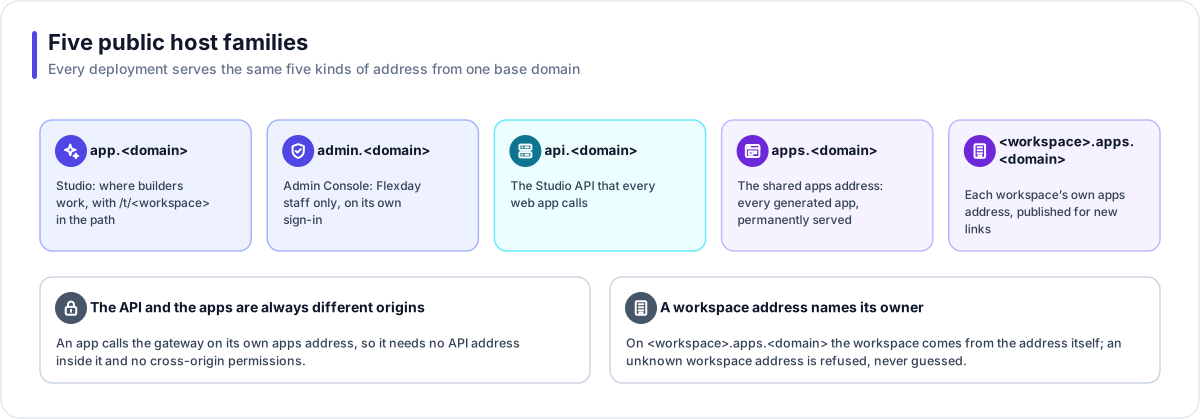
The five host families
| Address | Serves | Who uses it |
|---|---|---|
app.<domain> | Studio, with the workspace in the path (/t/<workspace>) | Builders and workspace admins |
admin.<domain> | The Admin Console, on its own staff sign-in | Flexday staff |
api.<domain> | The Studio API that Studio and the Admin Console call | Studio and the Admin Console; scripts using the Studio API |
apps.<domain> | The shared apps address: every generated app, and every gateway endpoint | End users, partner systems and Teams, for links handed out before workspace addresses |
<workspace>.apps.<domain> | The same apps and gateway, on each workspace's own address | End users, partner systems and Teams |
Flexday's own base domains are flexday.ai for production, with separate domains for its internal,
test and development environments. A private deployment uses a domain you own.
Why the API and the apps are separate
Generated apps are software the platform wrote for you. Keeping them on a different origin from the API and from Studio means:
- A generated app cannot use a builder's Studio session, even if both are open in the same browser.
- An app calls the gateway on its own address, so there is no cross-origin request to allow and no API address to embed.
- The apps origin can stay frameable, so the Studio preview works, while the Studio and API are not.
Workspace app addresses
Every link the platform hands out (in Studio, in the Admin Console, in an app's settings) is built on the server, which picks the right address for the workspace. No browser composes an app address itself, so switching a deployment to workspace addresses needs no new Studio release.
| Rule | What it means |
|---|---|
| The address decides the workspace | On a workspace address, the gateway resolves the workspace from the address before anything else. |
| Unknown means refused | An address that names no workspace is answered "unknown workspace", never served as another workspace's app. |
| Ambiguity is refused | On the shared address, an app name that two workspaces both use is not guessed. |
| Both keep working | New links use the workspace address; the shared address keeps answering for old links. |
| Exceptions | Teams webhooks and health checks answer on either address, because a Teams bot's endpoint is registered with Microsoft per Bot. |
A workspace address narrows how far a problem in one app can reach: files and sessions on it belong to one workspace, never to every app on the platform.
TLS
Every address is served over HTTPS. The workspace apps addresses are covered by a wildcard certificate
for *.apps.<domain>, which needs DNS-based validation. In a private deployment on your own domain, the
certificates come from AWS Certificate Manager on AWS, or from Front Door's managed certificates on Azure,
including the wildcard.