Architecture
Data architecture
Where each kind of data lives in Flexday AI, how every store is partitioned by workspace, and how Fact Base data is kept apart.
- Technical
Last reviewed
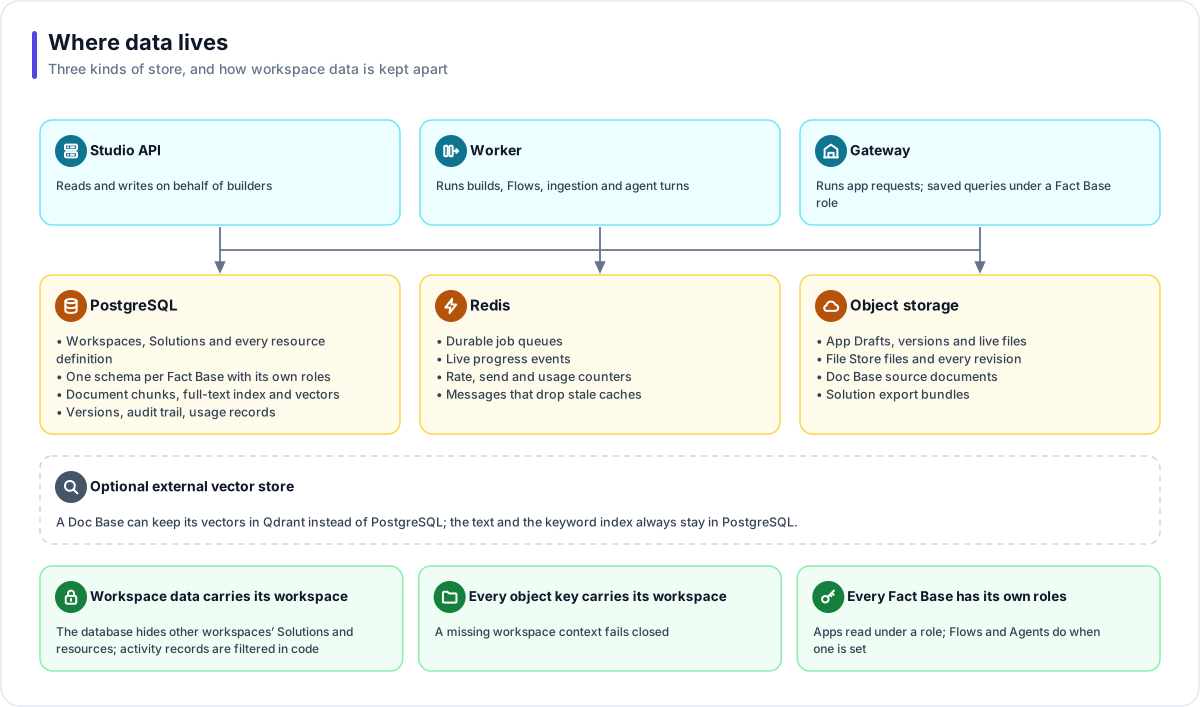
Flexday AI keeps data in three kinds of store. PostgreSQL is the system of record. Redis carries short-lived working state. Object storage holds files, including each app's working Draft. Records and stored objects that belong to a workspace are partitioned by it (the Redis job queues are shared, and every job carries its workspace), and every Fact Base has its own separate database schema with its own roles.
At a glance
- PostgreSQL is the source of truth. Resource definitions, versions, the audit trail, usage records and document text all live there.
- Each Fact Base is its own schema. Apps read it under one of its roles, and so do Flows and Agents when a role is set. A Flow step left on App role (full access), or an Agent grant set to No role, reads with the platform's own access.
- Workspace data carries its workspace. The database itself hides other workspaces' Solutions and everything they own from the application. Members, usage, run history and the audit trail are filtered by workspace in the application.
- Search runs in the same database by default. Document chunks, the keyword index and meaning vectors sit together, with Qdrant available as an alternative vector store.
PostgreSQL
| What | Notes |
|---|---|
| Platform records | Workspaces, members, Solutions and the definition of every resource. |
| Fact Base data | One schema per Fact Base, created when it is provisioned, with reader, writer and custom roles and optional row policies. |
| Documents for search | The text of every chunk, a full-text keyword index and, by default, meaning vectors using the pgvector extension. |
| Versions | Immutable, numbered snapshots of deployed apps, provisioned Fact Bases and published Flows and Agents. |
| Audit trail | Every change to an audited record, written by the database itself, with the person behind it: the signed-in member, or the staff member and their reason during a support session. Changes nobody started, such as scheduled runs and maintenance sweeps, are recorded as the platform. |
| Usage and access records | One usage record per model call; a file access log of who read each file; run and turn histories. |
Database changes are applied by the migrate task, in order, before any service is updated. Structural changes and behaviour (row-level security policies, database functions, permissions) are both versioned with the release.
Redis
Redis holds the durable job queues, the live progress events that stream to browsers, the rate, send and usage counters (for example a Solution's email allowance), and the messages that tell every server to drop a stale cached answer. It holds no business records: every job and its progress events are also recorded in PostgreSQL, so a stream can be replayed from there, and usage counts are flushed to PostgreSQL on a schedule.
Object storage
| What | Notes |
|---|---|
| Generated apps | Each LaunchPad's working Draft, every deployed version, and the live copy. |
| File Store files | Every revision, under a key made of the workspace, the store, the file and the version. No revision is overwritten. |
| Documents | The source files behind Doc Bases, which live in File Stores. |
| Bundles | Solution exports, saved as files in a File Store. |
Each app's Draft lives in object storage too, beside its deployed versions and under the same workspace prefix. Sample data you upload to a Fact Base is kept as a file in a File Store the Fact Base manages. The shared file system (Amazon EFS on AWS, Azure Files on Azure) now holds only copies written before those moves, which are still read until they are migrated, and temporary upload space.
Object storage can be Amazon S3 (or an S3-compatible service), Azure Blob Storage, or local disk on a single-host installation. Large files move directly between the browser and storage using short-lived signed links.
How data is isolated
| Layer | Rule |
|---|---|
| Records | Solutions and every resource they own carry their workspace, and PostgreSQL row-level security hides every other workspace's records from requests and background jobs alike; a request with no workspace scope sees none of them. Members, invitations, usage, run and conversation history, document chunks and the audit trail also carry their workspace, and the application filters them by it. |
| Solutions | In a Restricted workspace (set by the platform's operators), the database also hides Solutions the person holds no grant on. |
| Fact Bases | Apps query a Fact Base under one of its own roles, and Flows and Agents do when a role is set on the step or grant; row policies can narrow each end user to their rows. |
| Objects | Every object key starts with the workspace; a missing workspace context fails closed rather than falling back. |
See Data isolation for the full model.
Search data
A Doc Base pins one embedding model and one vector store. PostgreSQL always holds the text and the keyword index, so keyword search keeps working even if the meaning half is unavailable. Vectors live in PostgreSQL by default, or in Qdrant.