Governance
Change control and versioning
How changes reach production safely in Flexday AI - drafts, checks, explicit publishing, numbered versions and rolling forward.
- Everyone
Last reviewed
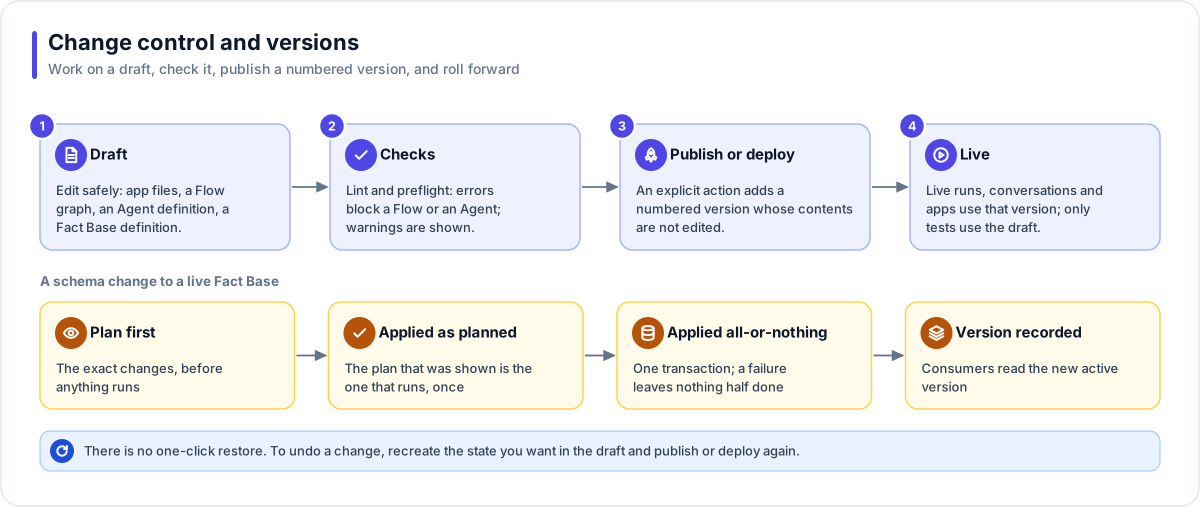
In Flexday AI, the parts that run (apps, Flows, Agents, Fact Base schemas and Data Portraits) change through drafts. You, or the Builder, work on a draft. Automatic checks run. An explicit publish or deploy adds a numbered version, and that version is what people and systems use. To undo a change you recreate the state you want in the draft and publish again. Some settings take effect as soon as you save them: an app's branding, saved queries, gateway endpoints, credentials, Identities, documents and files.
At a glance
- Drafts are safe. An edit to an app, a Flow or an Agent lands in a draft that serves no one; Studio test runs and the Playground can try it.
- Checks before release. Errors block publishing a Flow or an Agent; an Agent asks you to confirm warnings, and a Flow lists them.
- Versions keep their contents. Each publish or deploy adds a numbered version whose saved contents are not edited; earlier versions are marked superseded.
- Live use reads the active version. Live runs, conversations and apps use the published or deployed version, never the draft.
- Roll forward. There is no one-click restore: to go back, recreate the earlier state in the draft and publish again.
Draft, check, publish
| Resource | Draft | Checks | Applied state |
|---|---|---|---|
| LaunchPad | The Draft copy of the app files | The Builder's checks at the end of each turn; a deploy itself needs only an entry page | Deployed version (v1, v2, …); the first real build deploys itself, later deploys are yours. Brand changes apply to the live app directly. |
| Fact Base | The definition | The definition check (errors block) | Provisioned version |
| Data Portrait | The profile and ontology | Completeness of the profile | Profiled, then Published on sign-off |
| Flow | The graph | Graph and cross-resource checks | Published version; firing by itself also needs Enabled |
| Agent | The definition | The Agent check; optionally, evaluations must pass | Published version; there is no unpublish, only switching off |
| Template | The Template itself | The publish preflight | Released version (major.minor.patch); catalog snapshots are frozen |
The Builder can also publish the Flows and Agents it builds; errors, and an Agent's required evaluations, block it there too. It cannot switch a Flow on, and the only app deploy it makes is the one at the end of the app's first real build.
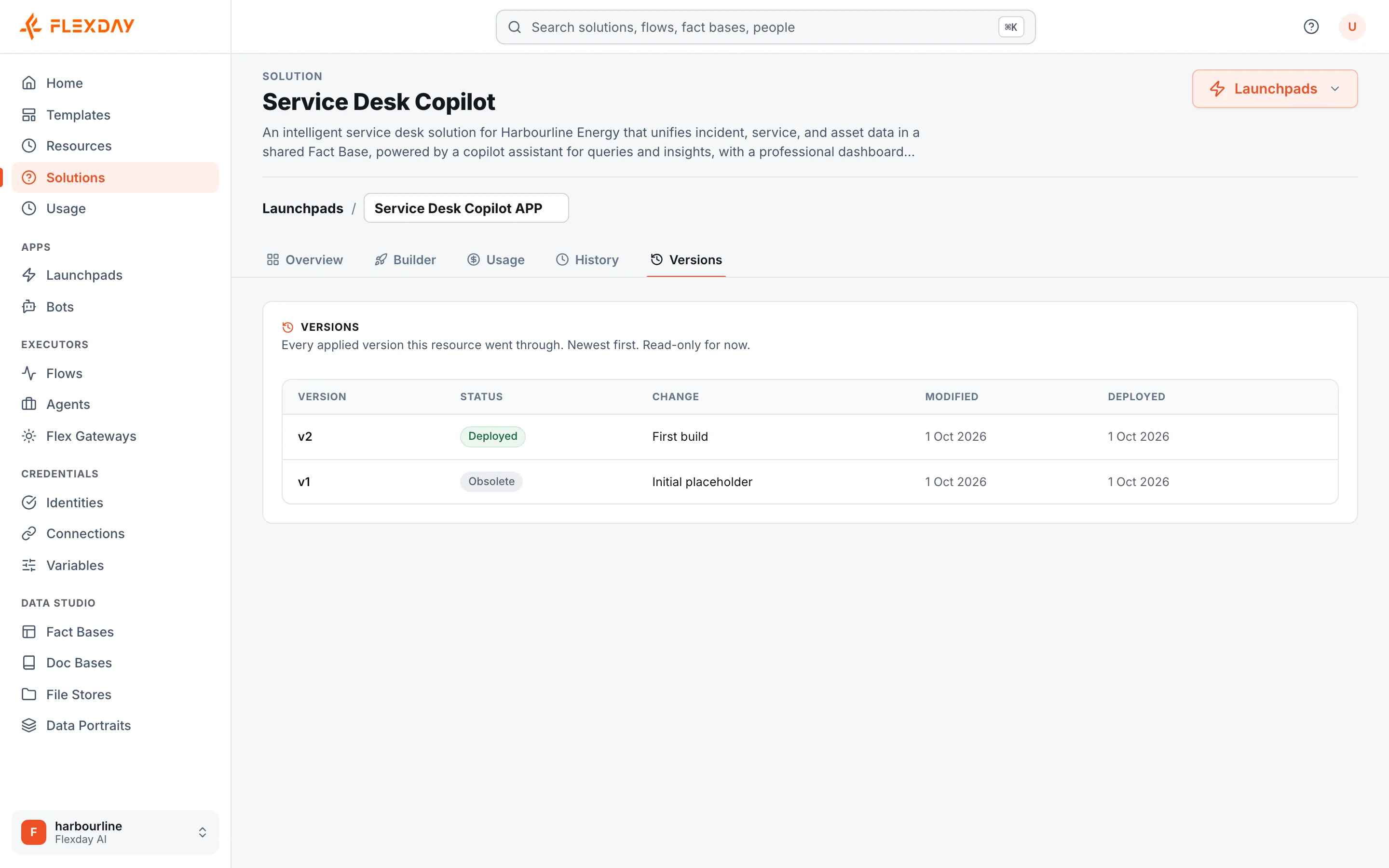
Each version records its number, its status, a short summary of the change and when it was made; Agent and Data Portrait versions also record the versions of their sources they were built on. Versions do not record who published them. A resource's Versions tab lists its versions newest first, and LaunchPads and Fact Bases add a Draft row on top when there are changes not yet applied.
Consumers read the active version
- A live Flow run executes the published version it started with, with the settings captured at the start; a test run from the Studio runs the draft.
- An Agent conversation pins its version when it opens, so a publish mid-conversation does not change the rules under someone; a Playground conversation on the draft follows the draft.
- An app reads through gateway endpoints that point at saved queries on the provisioned Fact Base.
- The Builder reasons over the provisioned Fact Base, and it is told separately about draft changes not yet applied.
Schema changes to live data
Changing the structure of a provisioned Fact Base is the riskiest change in the platform, so it has its own process:
- Plan first. The exact changes are worked out before anything runs. In the Studio you see and approve the plan; the Builder is told to describe it in the chat before applying it, and does not wait for an answer.
- Applied as planned. The plan that was shown is the plan that runs, once. A stale plan applies nothing and a fresh one is produced instead.
- Applied all-or-nothing. One database transaction; a failure leaves nothing half done, and the message names what failed.
- Version recorded. Consumers move to the new active version.
A destructive rebuild of the schema is a separate action that needs explicit confirmation. Replacing data never empties a table you did not name, and refuses to empty a table a live app writes to unless you asked to reset it.
Safe concurrency
- Two people editing the same Variable get one success and one clear conflict, never a silent overwrite. Agent and Flow drafts keep the most recent save.
- Version numbers are assigned under a lock, so concurrent publishes cannot collide.
- Only one Builder turn runs per Solution at a time.
Releases of the platform itself
Platform releases apply database changes first, from a single migrate step that holds a lock, then roll each changed service, rolling it back automatically if its new copies do not become healthy. In a dedicated deployment, whoever operates it decides when a release is applied. See Reliability and business continuity.
What an evaluator can verify
| To confirm | Where to look in a trial |
|---|---|
| That live use reads the published version | Edit a published Agent's instructions without publishing. The Playground, on the draft, shows the change; a live app still gets the published behaviour until you publish. |
| That errors block publishing | Break a Flow's draft, for example by leaving a required field empty: Publish stays disabled while there are errors. |
| What each version records | A resource's Versions tab: version, status, change, when it was made and, for an app, when it was deployed. |
| That an app's draft is separate | A LaunchPad's Versions tab shows a Draft row while there are undeployed changes; the live app shows the last deployed version. |